Bitget App
Trade smarter
Buy cryptoMarketsTradeFuturesStocksEarnInstitutionAI & More
Essential guide for affiliates
Bitget CFD affiliate guide: four account modes and how to set up referral links

Bitget CFD affiliate guide: four account modes and how to set up referral links

Beginner
2026-11-11 | 5m
Bitget offers one-stop trading for cryptocurrencies, stocks, and gold. Trade now!
A welcome pack worth 6200 USDT for new users! Sign up now!
Bitget CFD offers four account modes: ECN, zero-fee, Standard+, and Pro. As an affiliate, four things matter most: which account mode suits which users, what spreads apply to your users in each mode, how much commission you earn, and how to switch between modes. This guide walks you through each one.

1. Overview of the four modes

ECN mode
Zero-fee mode
Standard+ mode
Pro mode
Commission
Charged per lot
None
None
Charged per lot (same as ECN)
Spread
Tightest
Wider
Widest for gold
Independent quotes, better depth
Symbol suffix
None
.s
.p
.pro
Affiliate rebate method
Commission × (40%–50%)
Fixed USDT/lot, three tiers
Commission × (40%–50%) (same as ECN)
Gold rebates (per lot)
3 USDT
10.47–12.00 USDT
17.96–20.00 USDT
3 USDT
How users switch modes
Manual switching
Manual switching
Manual switching
Application required
Default for new users
No
Yes
No
No
As an example, here are the user's reference total cost and the affiliate's rebate for 1 lot of gold (VIP2 and below):
Mode
User cost
Rebate per lot
Rebate vs. ECN
ECN
16 USDT ($10 spread plus $6 commission)
3 USDT
Baseline
Zero-fee
25 USDT ($25 spread, no commission)
10.47–12.00 USDT
About 3.5–4 times
Standard+
33 USDT ($33 spread, no commission)
17.96–20.00 USDT
About 6–7 times, or about 1.7 times zero-fee
Pro
34 USDT ($28 spread plus $6 commission)
3 USDT
Baseline

2. Which mode is right for each type of user

ECN mode: cost-sensitive, high-frequency traders

ECN is suitable for intraday, short-term, and high-frequency traders, as well as experienced users who are sensitive to spreads. It reflects raw market quotes and offers the tightest spreads, while charging a commission per lot. This results in the lowest overall cost among the four modes. For affiliates, rebates in this mode are stable and predictable, though relatively low compared with the other modes.

Zero-fee mode: beginners and low-frequency traders

The zero-fee mode is suitable for beginners, users who trade less frequently or take medium- to long-term positions, and those who prefer simpler transaction records. This mode charges no commission, with all costs incorporated into the spread, making transaction records easy to understand. It is also the default mode for new users. For affiliates, rebates are significantly higher than in ECN mode. For gold, for example, they're 3.5 to 4 times the ECN rebate. When introducing this mode to users, you can highlight that it charges no commission, but do not say that it is zero-cost, as costs are included in the spread.

Standard+ mode: affiliates with strong operational capabilities

Standard+ is suitable for affiliates who proactively manage user relationships, have earned a high level of trust, and have users who are receptive to their recommendations. This mode also charges no commission. Its gold spread is wider than in zero-fee mode, and in exchange, it offers the highest affiliate rebates of the four modes: up to 20 USDT per lot of gold at the Senior tier. Before recommending it, consider three factors: whether the user trusts you enough, how cost-sensitive the user is, and whether you can retain the user through service and added value. This mode is not recommended for users who are extremely cost-sensitive and likely to compare prices.

Pro mode: professional and institutional-grade users

Pro mode is suitable for high-frequency traders, arbitrage traders (such as those engaged in gold spot-futures arbitrage), quantitative and algorithmic traders, and experienced traders with substantial capital. It uses independent institutional-grade quotes. Its value lies in execution quality and stability for large trades rather than lower costs per trade. For affiliates, its rebate structure is identical to that of ECN. A client's use of Pro mode will not change your rebate structure.

You cannot activate or exit Pro mode on your own. You must contact the business representative or customer service to apply. Pro mode will only be activated after approval, and applications may be rejected. Eligibility requirements include:
  • Account equity or initial deposit of at least $10,000.
  • Users who have already traded on Bitget CFD must provide their user ID.
  • Users who have not yet traded on Bitget CFD must provide at least three consecutive months of trading records from another trading platform.
If a user is assessed as currently unsuitable for Pro mode, we recommend that they continue using an ECN or zero-fee account. If you are unable to determine whether a user qualifies, provide their user ID and ask your BD or customer service for an assessment. Exiting Pro mode also requires an application. Before applying, make sure you have asked the user to close all pending orders and positions.


How to choose a mode for users

Work through these questions in order:

1. Is the user a newly signed up user? New users default to zero-fee mode, so first assess whether they need to switch.

2. If the user is not new, consider their trading frequency. For high-frequency or short-term intraday users, assess their suitability for Pro if they engage in arbitrage or quantitative trading, or have substantial capital. Otherwise, recommend ECN.

3. For users who trade at low to medium frequency or take medium- to long-term positions, consider Standard+ if you have strong operational capabilities and the user trusts you. Otherwise, recommend zero-fee mode.

Standard+ is not recommended for general users who trade directly. It's an account type that gives affiliates with strong operational capabilities greater rebate potential.
User attribute
Recommended mode
Reason
Beginners, low-frequency traders
Zero-fee
Simple transaction records, no commission to worry about
Swing and long-term position holders
Zero-fee
Position costs are incorporated into the spread, making it more suitable overall
General intraday high-frequency traders
ECN
Tightest spreads and lowest overall cost
High-frequency EA or algorithmic traders
ECN or Pro
Assess based on their capital size and execution requirements
Professional arbitrage traders (such as gold spot-futures arbitrage)
Pro
Institutional-grade liquidity supports arbitrage strategies
Experienced traders with substantial capital
Pro
Institutional-grade environment matches their trading size and provides more stable execution
Users under affiliates with strong operational capabilities
Standard+
Highest rebates, maximizing affiliate earnings

3. Affiliate rebates under each mode

ECN and Pro: commission × 40%–50%

Under these two modes, you receive a rebate equal to 40%–50% of the commission actually paid by the user. The commission rates are as follows:

Instrument
VIP2 and below (per lot)
VIP3 and above (per lot)
Forex, gold, silver
$6
$5.4
Crude oil and other commodities
$3
$2.7
HK50
$1.5
$1.35
JP225
$0.1
$0.09
Other indices
$3
$2.7
For example, at a 50% rebate rate, if a VIP2 or lower user trades 1 lot of gold, your rebate is 6 × 50% = 3 USDT.

Zero-fee and Standard+: fixed USDT amount per lot across three tiers based on monthly trading volume

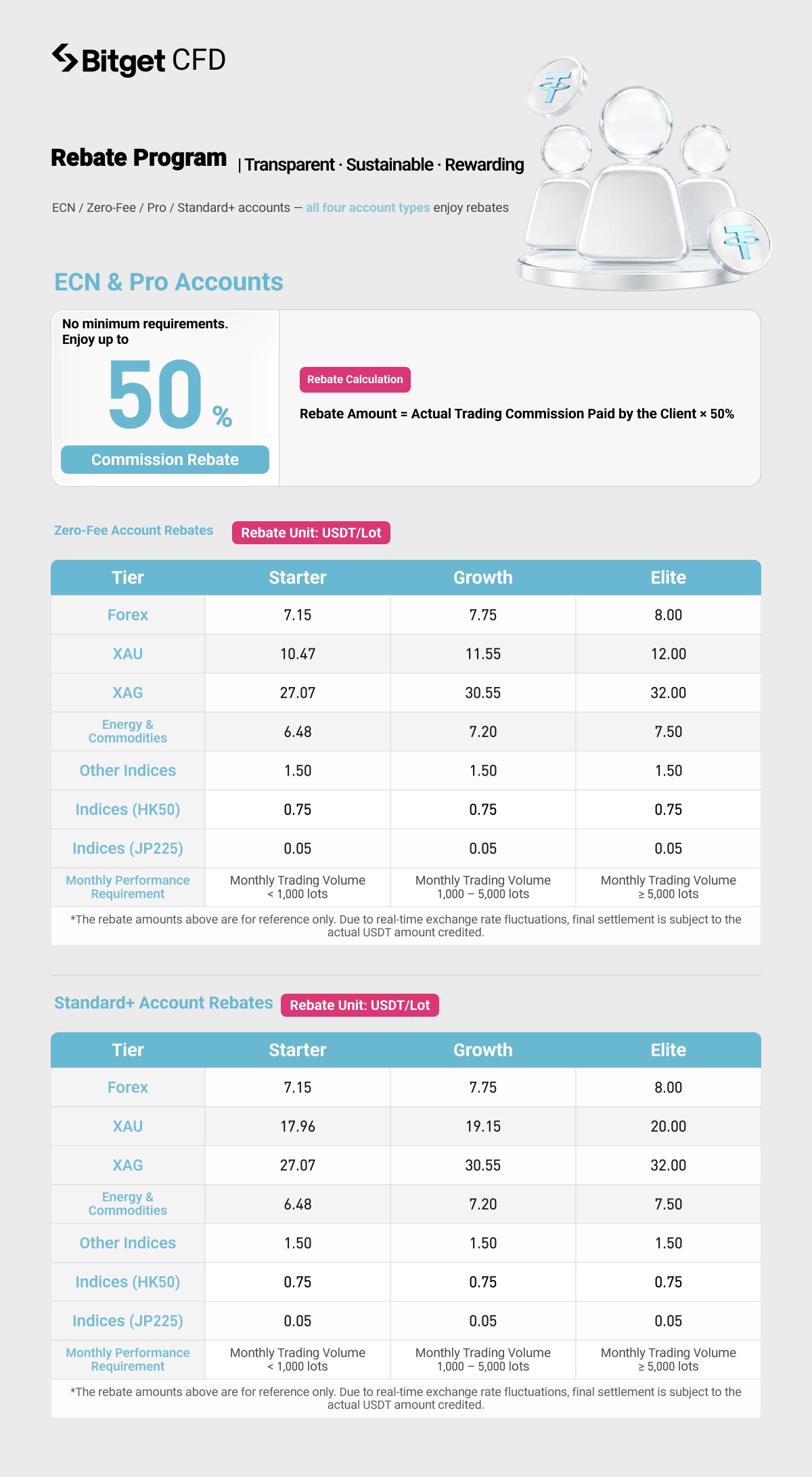
Rebates under these two modes are not based on commission. Instead, affiliates receive a fixed amount per lot based on their referrals' monthly trading volume. Junior applies to a monthly trading volume below 1000 lots, Intermediate applies to 1000–5000 lots, and Senior applies to 5000 lots or more. (Trading volume is calculated based on closed lots.)
Instrument (USDT/lot)
Junior
Intermediate
Senior
Forex (same for both modes)
7.15
7.75
8.00
Gold: zero-fee
10.47
11.55
12.00
Gold: Standard+
17.96
19.15
20.00
Silver (same for both modes)
27.07
30.55
32.00
Crude oil/commodities (same for both modes)
6.48
7.20
7.50
Other indices (same for both modes)
1.50
1.50
1.50
HK50 (same for both modes)
0.75
0.75
0.75
JP225 (same for both modes)
0.05
0.05
0.05
Compared with zero-fee mode, Standard+ has different rebates only for gold. Rebates for all other instruments are identical. The rebate amounts above fluctuate in real time with exchange rates and are for reference only. The actual USDT amount credited will prevail.

How rebate tiers are upgraded or downgraded
Once the corresponding lot threshold is reached within a calendar month, the new tier takes effect the following day. On the first day of each month, the platform adjusts rebate tiers based on the channel's performance in the previous month. If the upgrade threshold is reached early in the current month, the platform may upgrade the tier ahead of schedule. Downgrades are more lenient: a tier is only lowered automatically to the corresponding level if the assessment criteria aren't met for a full quarter.
Affiliate rebate reference poster (using a 50% rebate rate as an example):
Bitget CFD affiliate guide: four account modes and how to set up referral links image 0

4. Users' trading costs

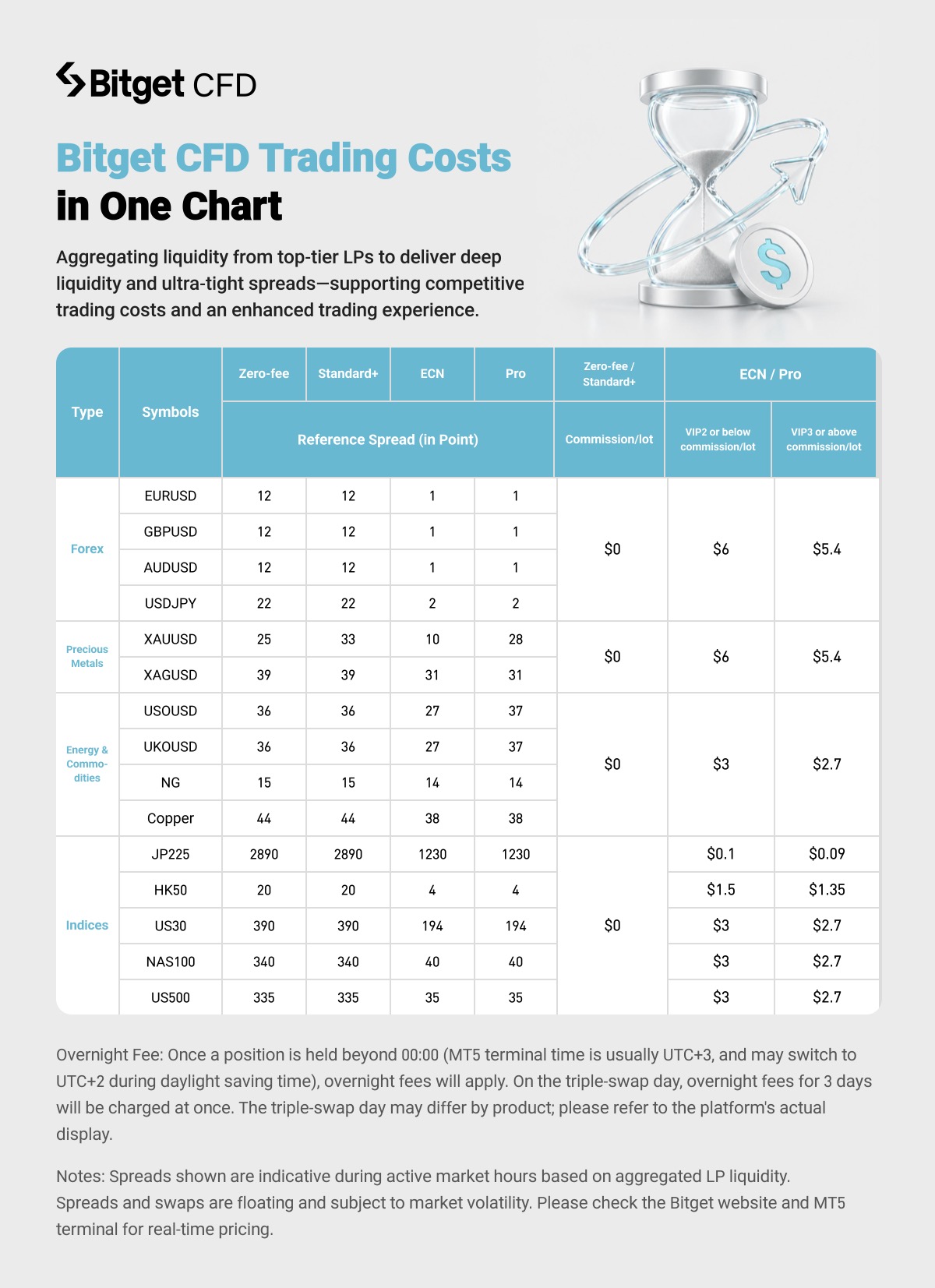
The table below shows reference spreads for each instrument, measured in points. These are reference quotes from active market hours, based on the best available liquidity aggregated from multiple top-tier liquidity providers. They fluctuate with market conditions. For actual spreads, refer to the real-time quotes on the Bitget website and in the MT5 terminal.
Bitget CFD affiliate guide: four account modes and how to set up referral links image 1
ECN generally offers the tightest spreads but charges a separate commission. Zero-fee and Standard+ differ only in their gold spreads (Standard+ being wider). Pro has wider spreads than ECN only for gold (28 vs. 10) and crude oil (37 vs. 27) because it uses independent quotes.
All four modes incur swap fees. Swap accrual begins when a position is held past 12:00 AM (MT5 terminal time, usually UTC+3, which may change to UTC+2 during daylight saving time). On the triple swap day, three days' swap fees are charged at once. The triple swap day may vary by product, so refer to the information shown on the platform.

5. How affiliates generate referral links preset to each CFD account mode

To make it easy for affiliates to set a CFD account mode for new referrals in advance, we've added a CFD Account Opening Mode option to the referral link creation flow. When you create a referral link, you can now choose a mode. New users who sign up through that link will automatically use the selected mode when they open a CFD account. This lets you share links with different CFD account modes for different user segments.
Here's how to create a referral link preset to Standard+ mode:

In the app

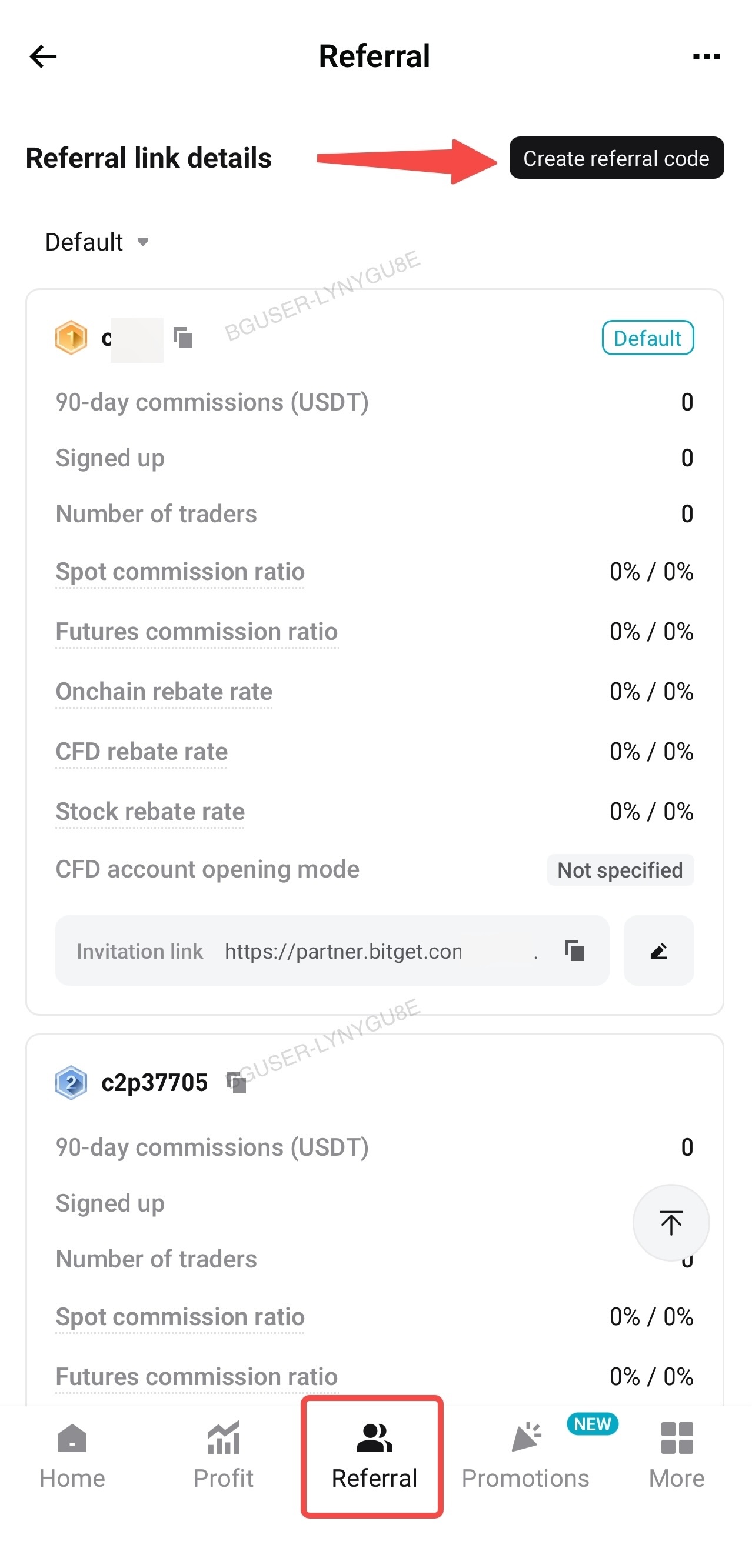
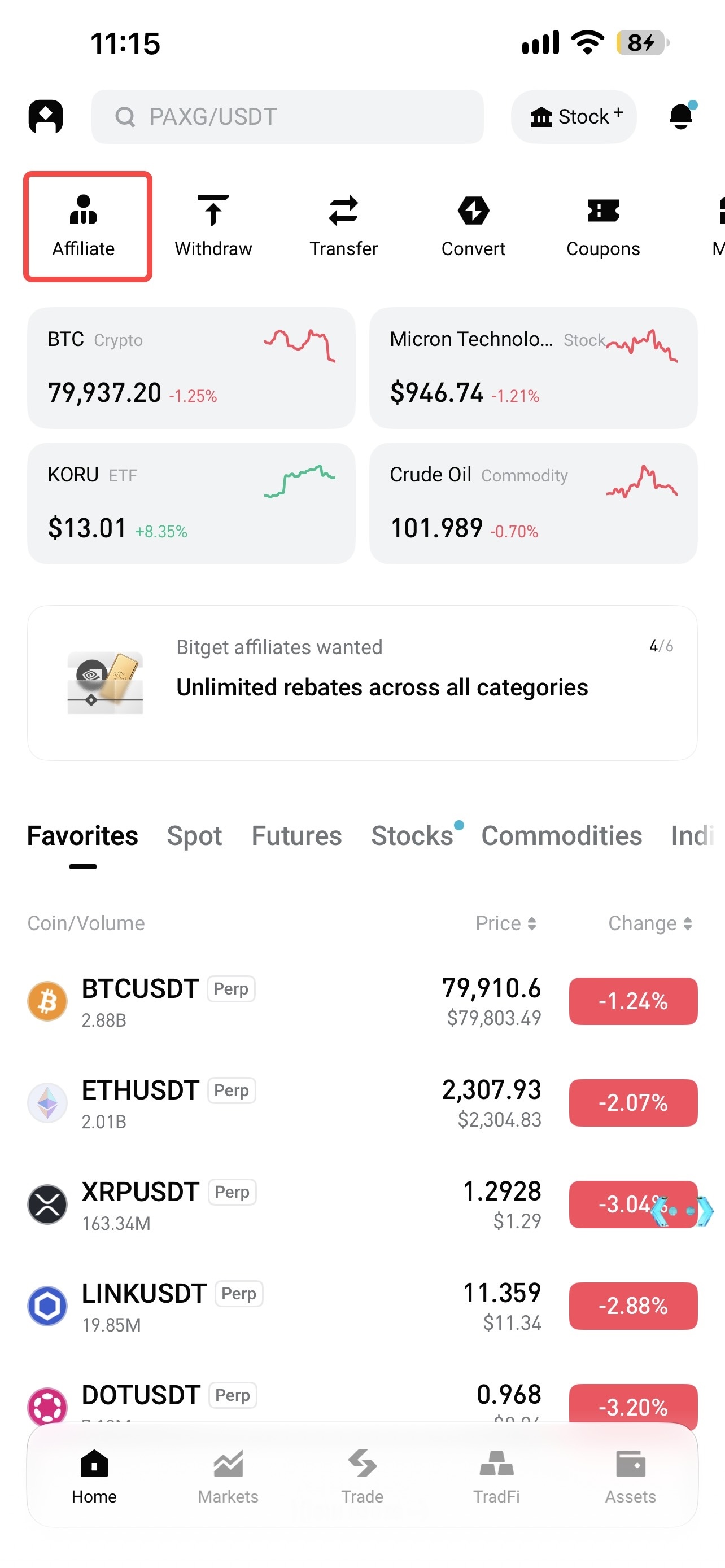
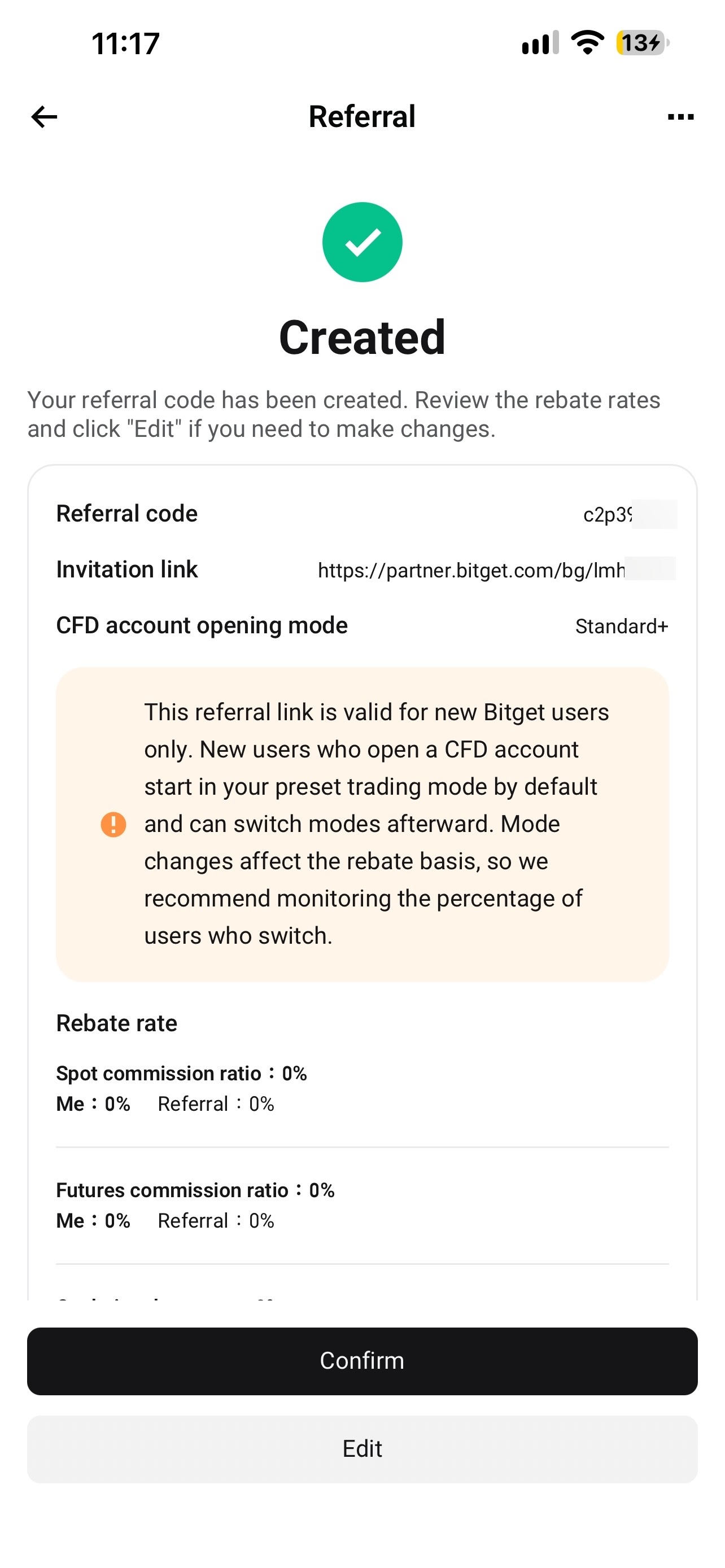
1. Go to Affiliate Portal → Referral Center → Referral Promotion → Create Referral Code.
Bitget CFD affiliate guide: four account modes and how to set up referral links image 2 Bitget CFD affiliate guide: four account modes and how to set up referral links image 3

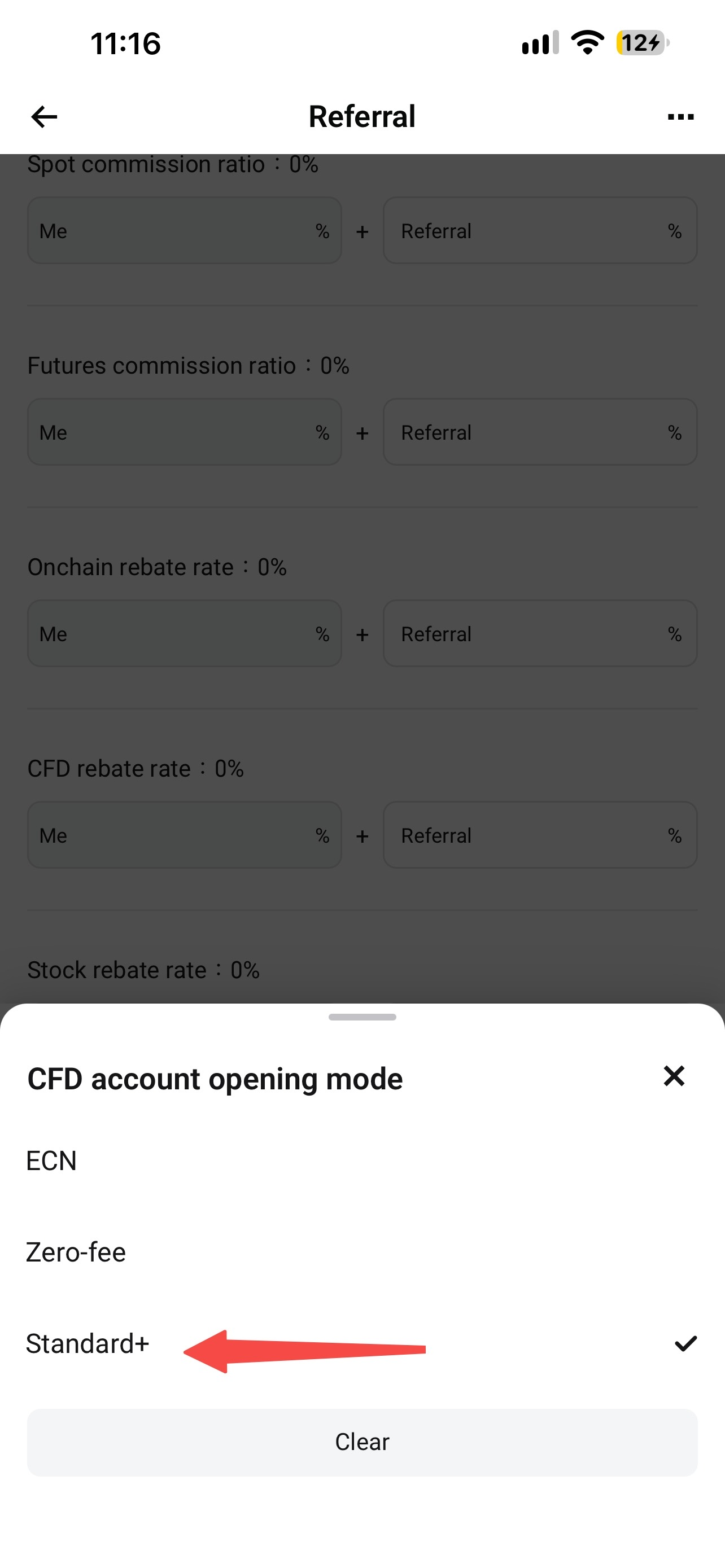
2. Find the new CFD Account Opening Mode option and select Standard+ from the dropdown menu (the default is zero-fee mode).
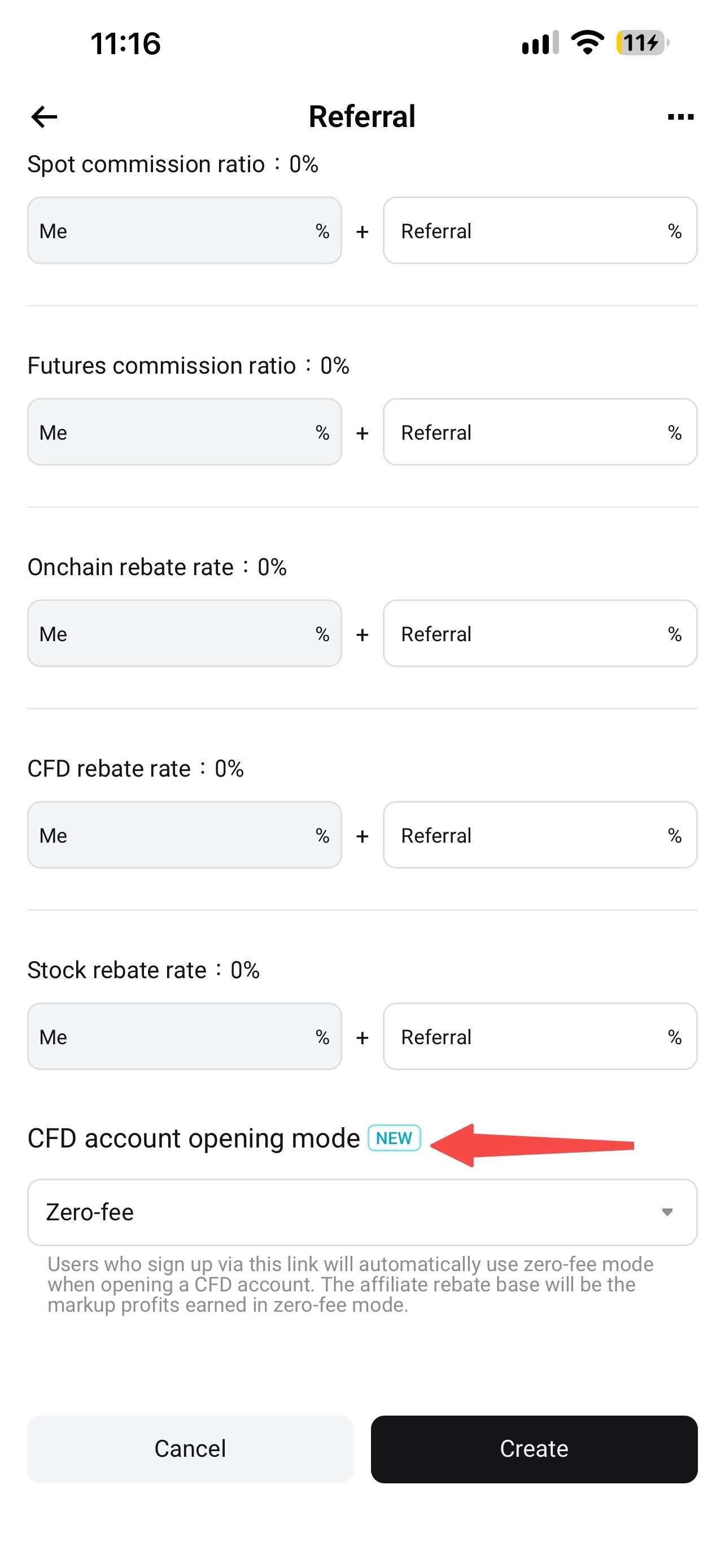
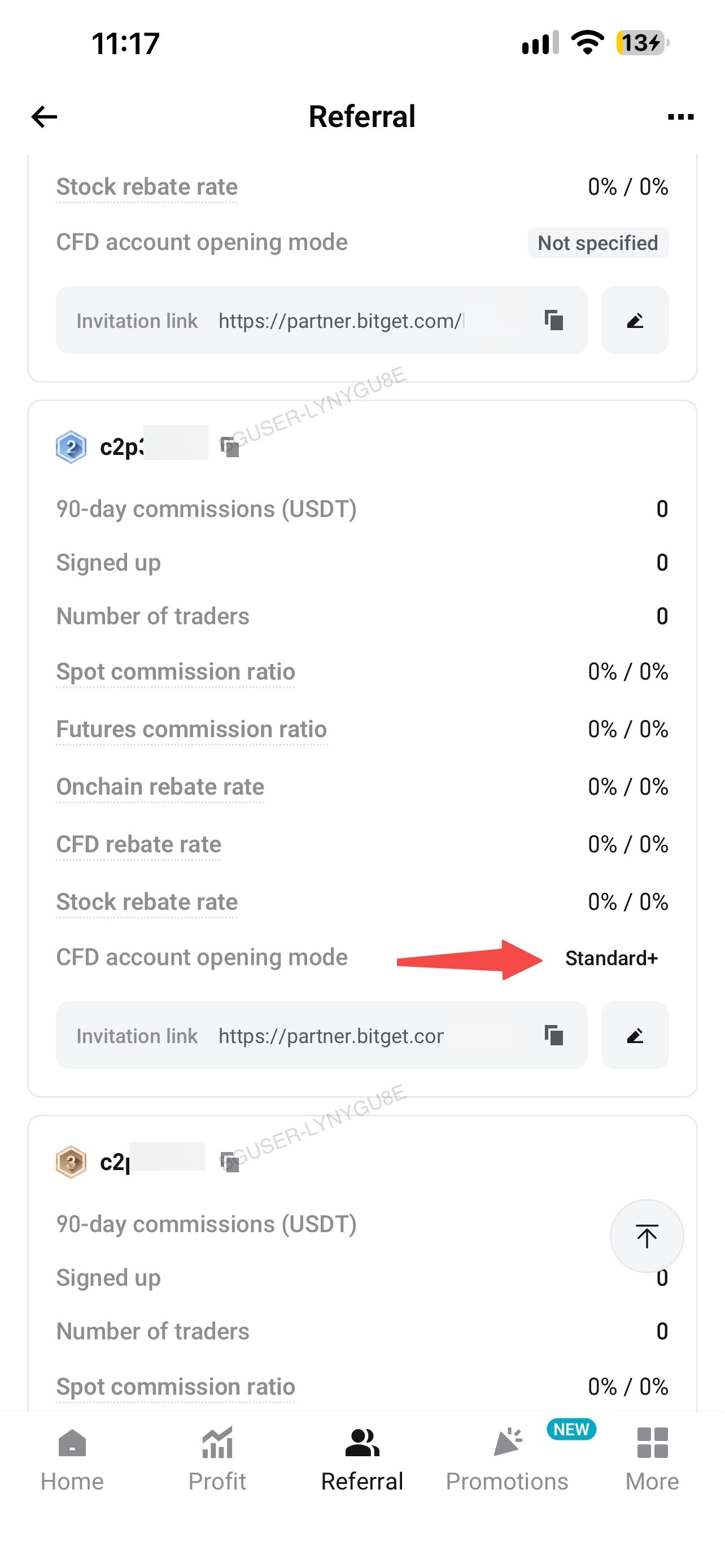
3. Confirm and create the link. The info card on the confirmation page shows the selected mode. You can also check it later on the Link Settings page. The referral link list also has a new CFD Account Opening Mode column for each link's mode. Existing links without a mode are marked Not Specified in this column.Note: you can't change a link's CFD account mode after it's created. To use a different mode, create a new referral link.
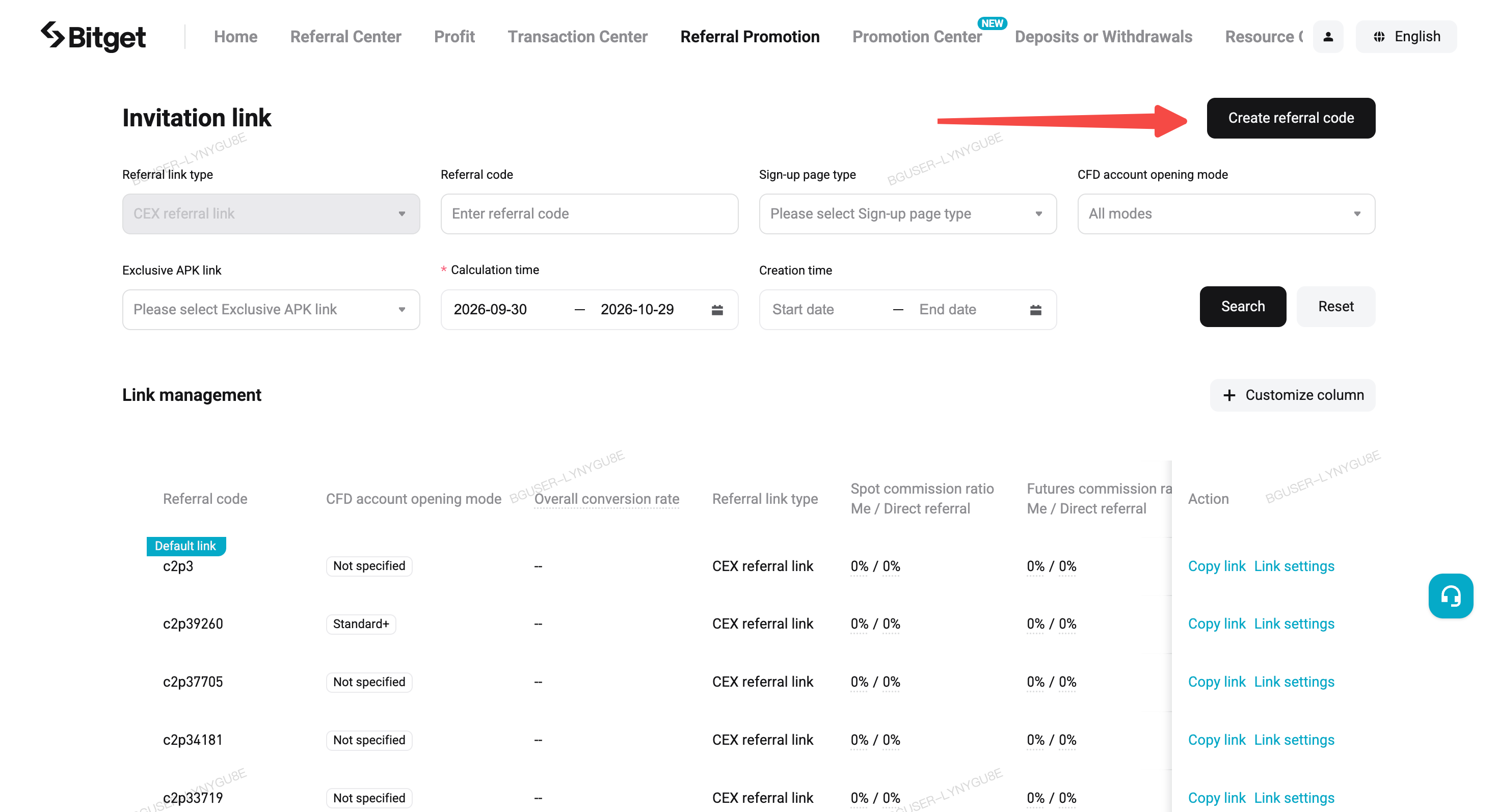
On the website

1. Go to Affiliate Portal → Referral Promotion → Create Referral Code.
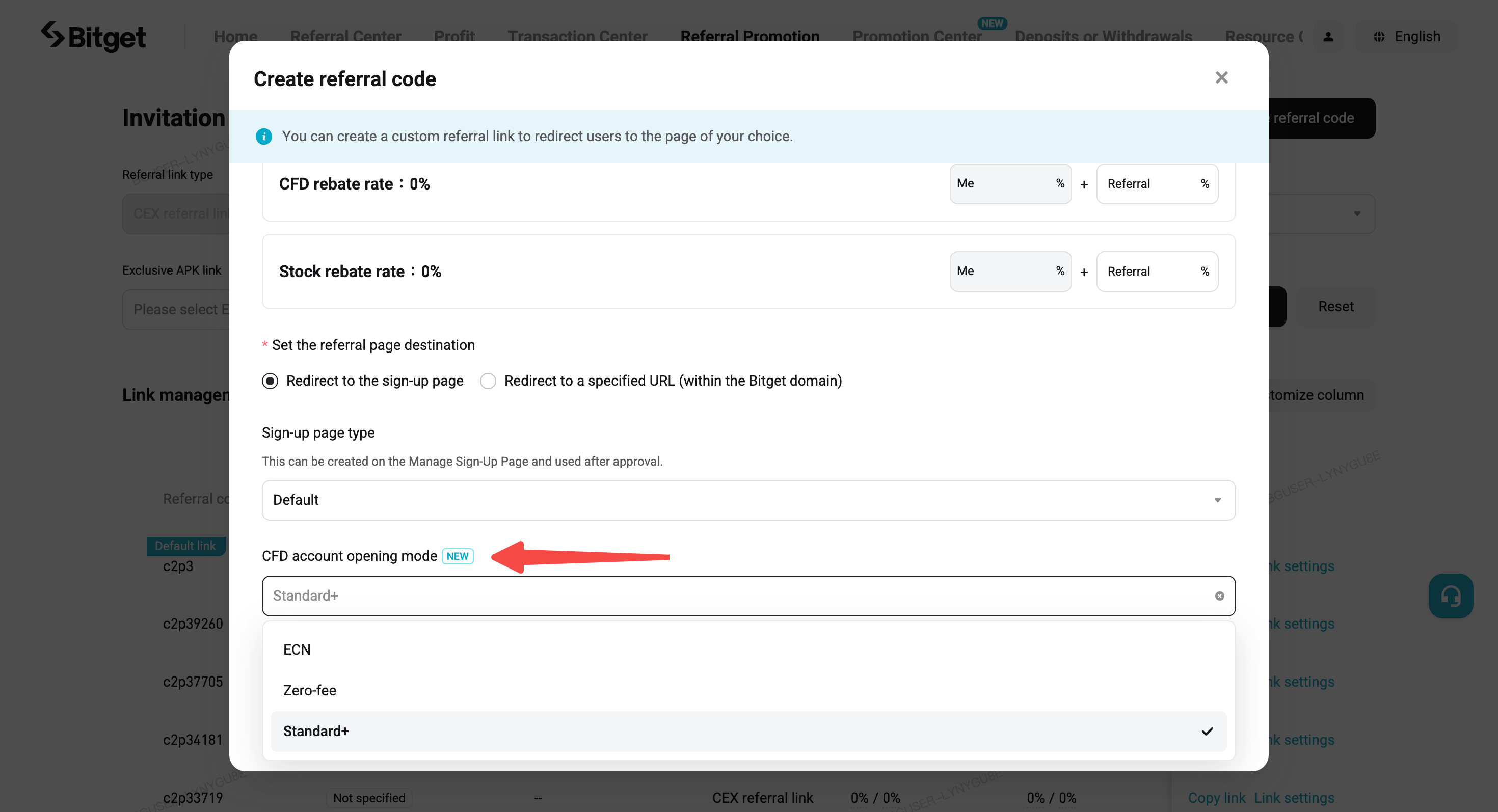
Bitget CFD affiliate guide: four account modes and how to set up referral links image 8

2. Find the new CFD Account Opening Mode option and select Standard+ from the dropdown menu (the default is zero-fee mode).
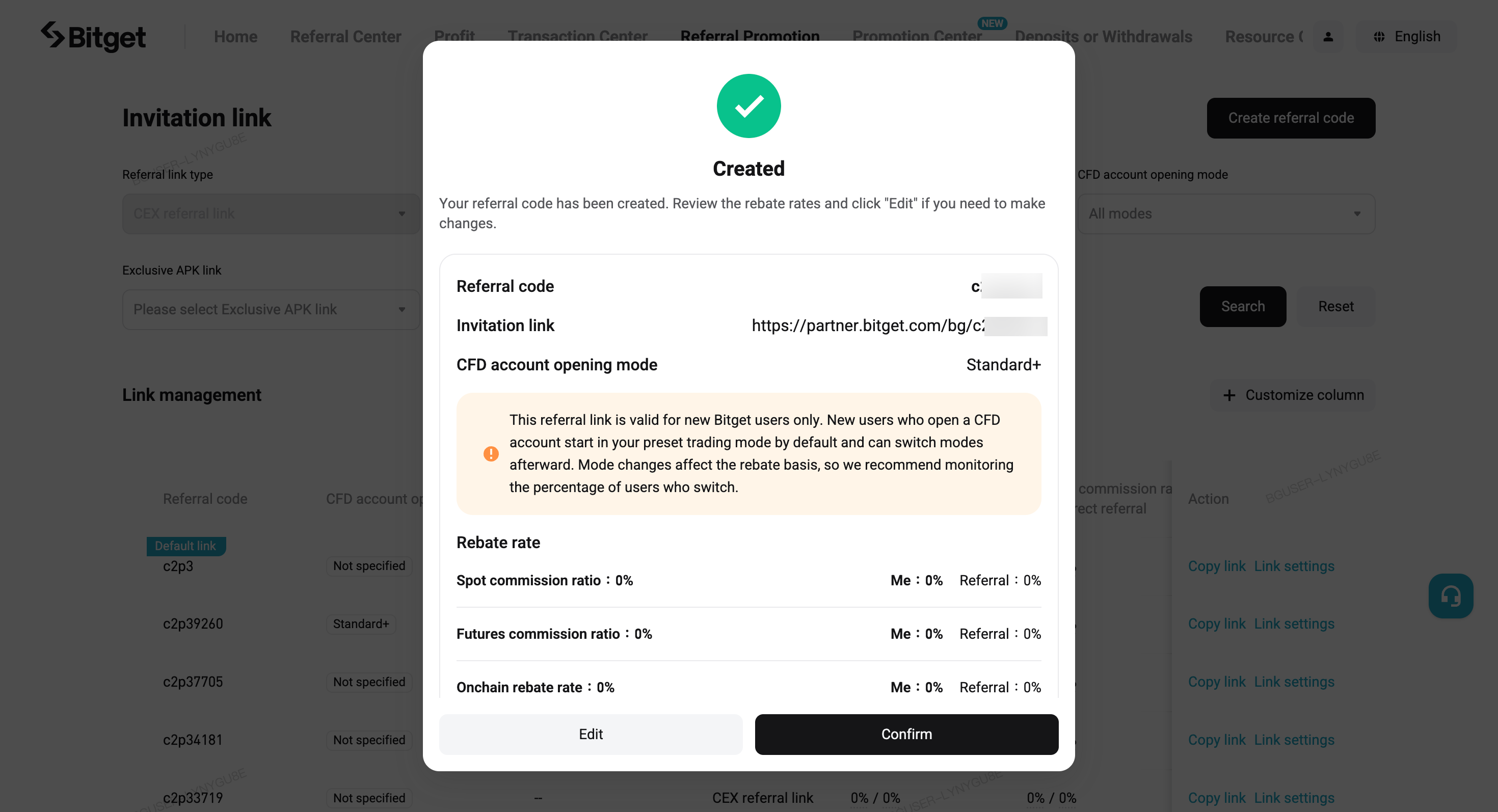
Bitget CFD affiliate guide: four account modes and how to set up referral links image 9

3. Confirm and create the link. The info card on the confirmation page shows the selected mode. You can also check it later on the Link Settings page.Note: you can't change a link's CFD account mode after it's created. To use a different mode, create a new referral link.
4. Checking your links later: you can find each link's mode tag on the Link Settings page. The referral link list also has a new CFD Account Opening Mode column after the referral code column, with a filter dropdown. Existing links without a mode are marked Not Specified in this column.
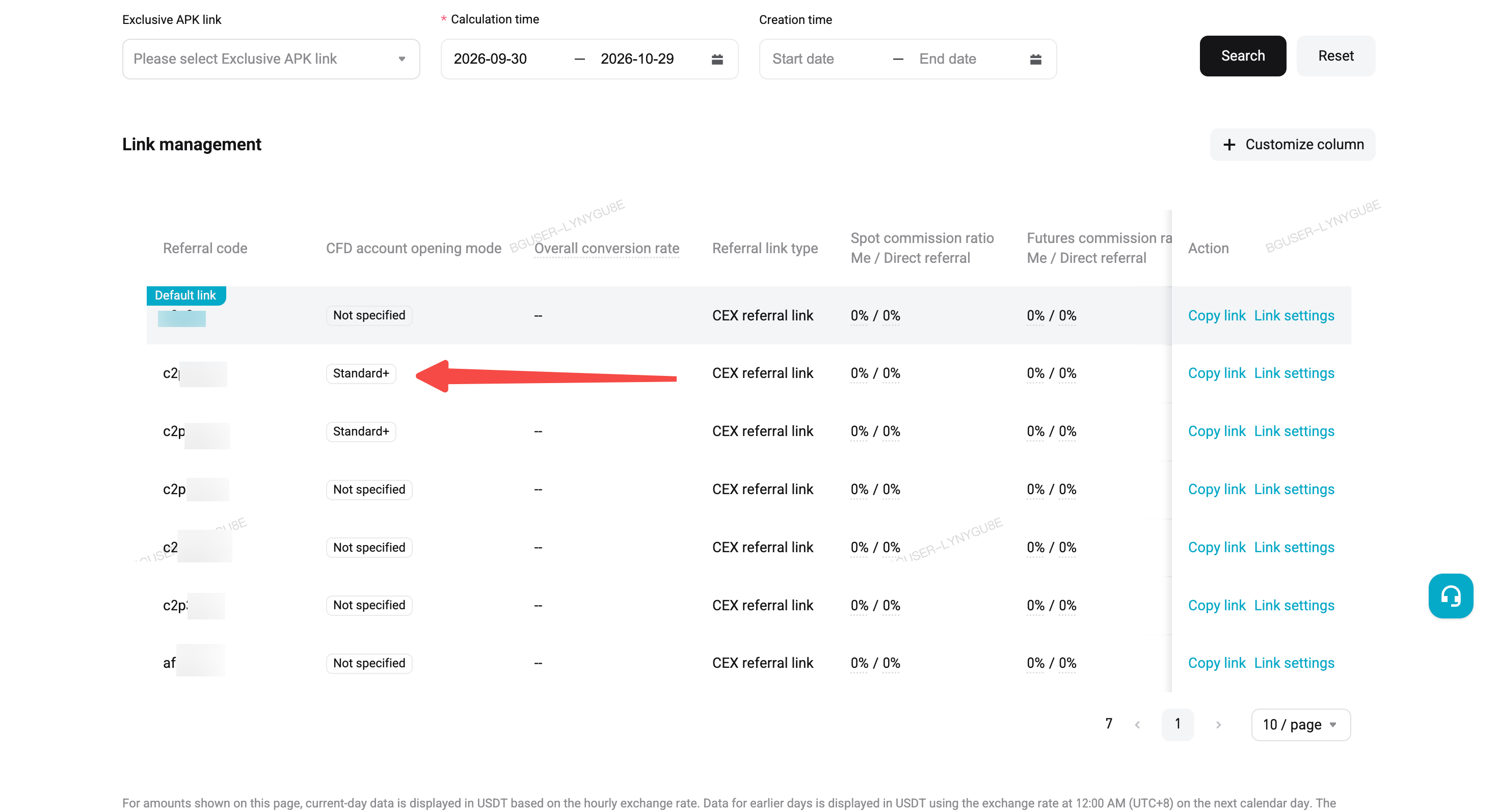
This referral setting applies only to new Bitget users. New users will use the selected mode by default when they open a CFD account. After opening an account, users can switch modes themselves. Mode changes affect your rebate basis, so we recommend tracking the share of users who switch.

6. How to help users switch CFD account modes

To help users switch to another CFD account mode, share the steps below with them. This example uses Standard+.

Manual switching for app users

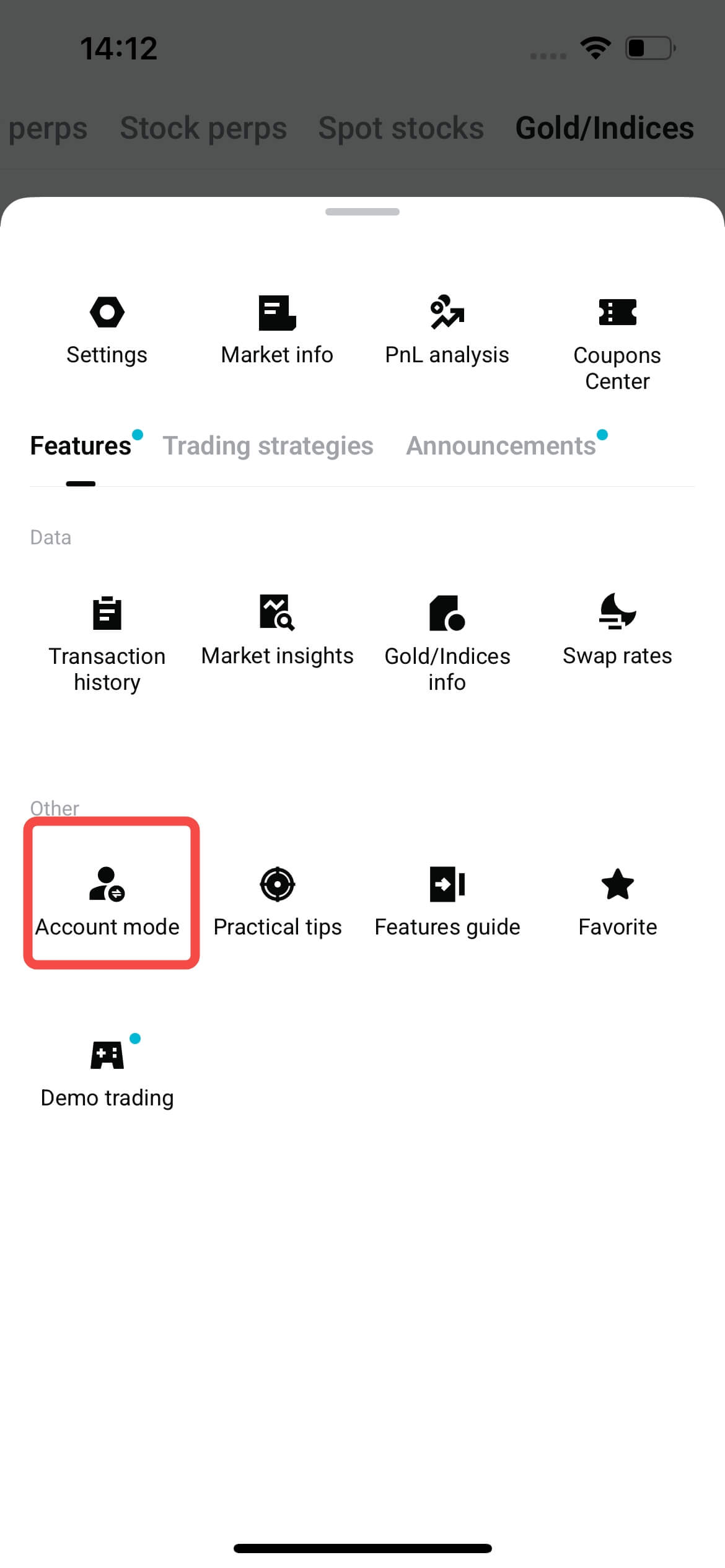
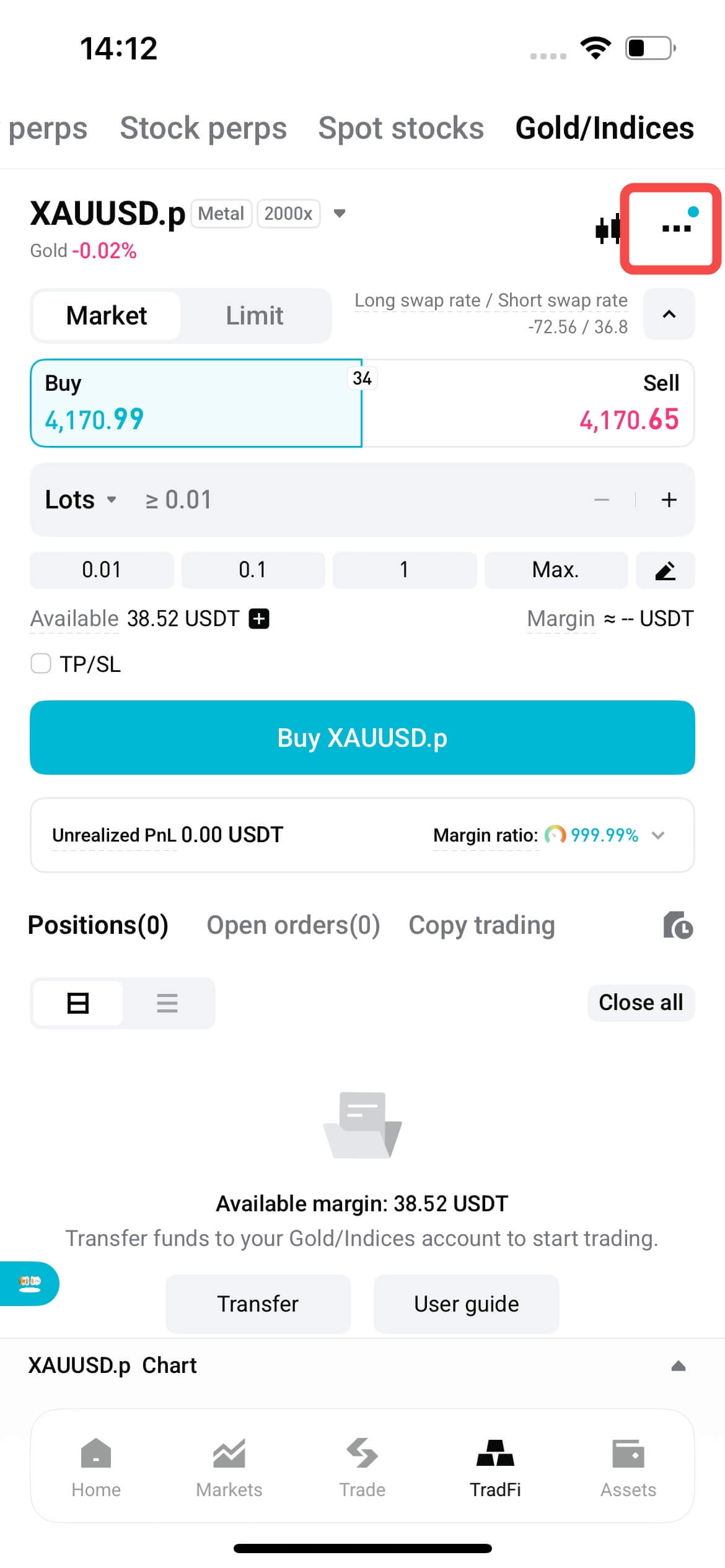
1. Find Account Mode Settings: On the trading page, tap Account Mode to open the selection window.
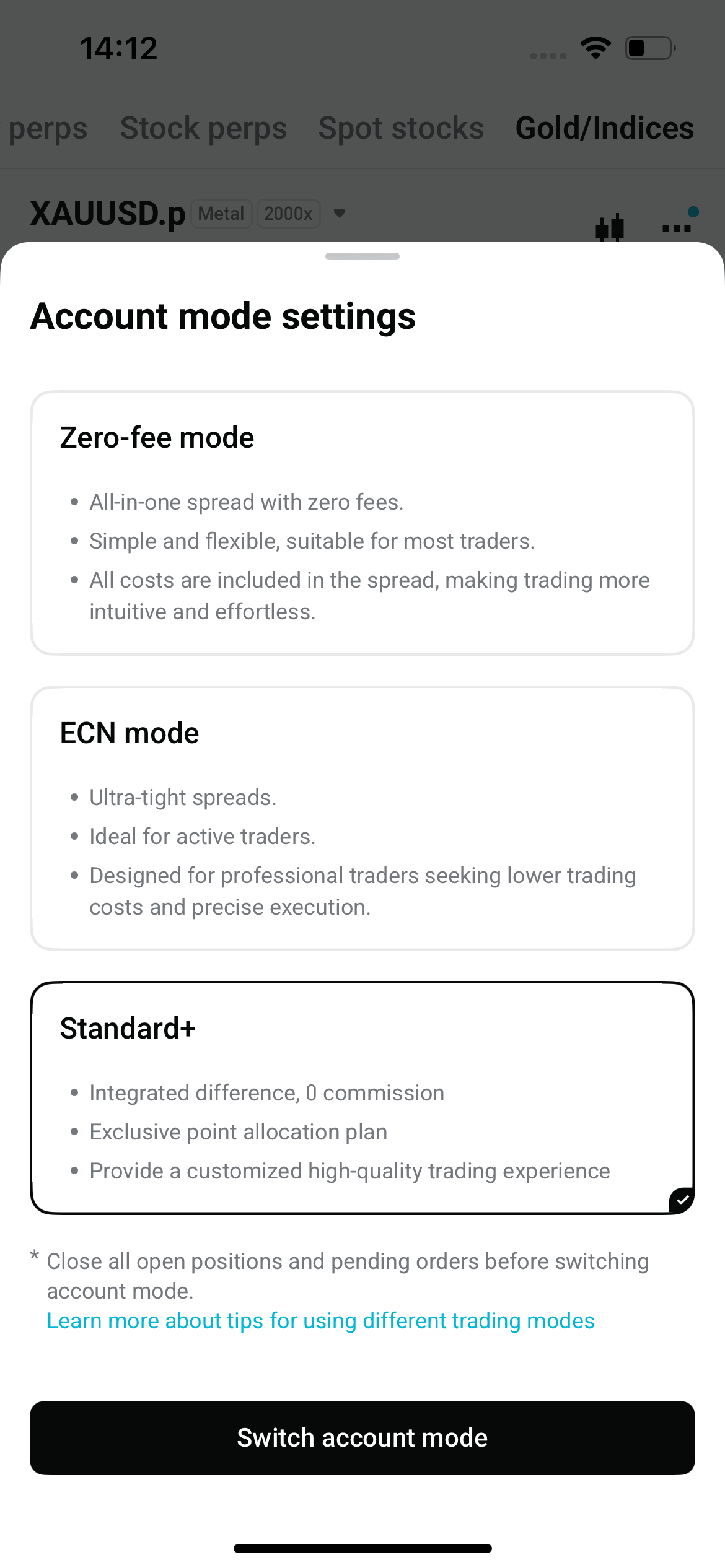
2. Select Standard+ and confirm: In the pop-up window, select Standard+ and confirm the change. Your account must have no open positions or pending orders before you switch. The change takes effect immediately. To switch to a different mode, just select that mode instead.
Manual switching for website users
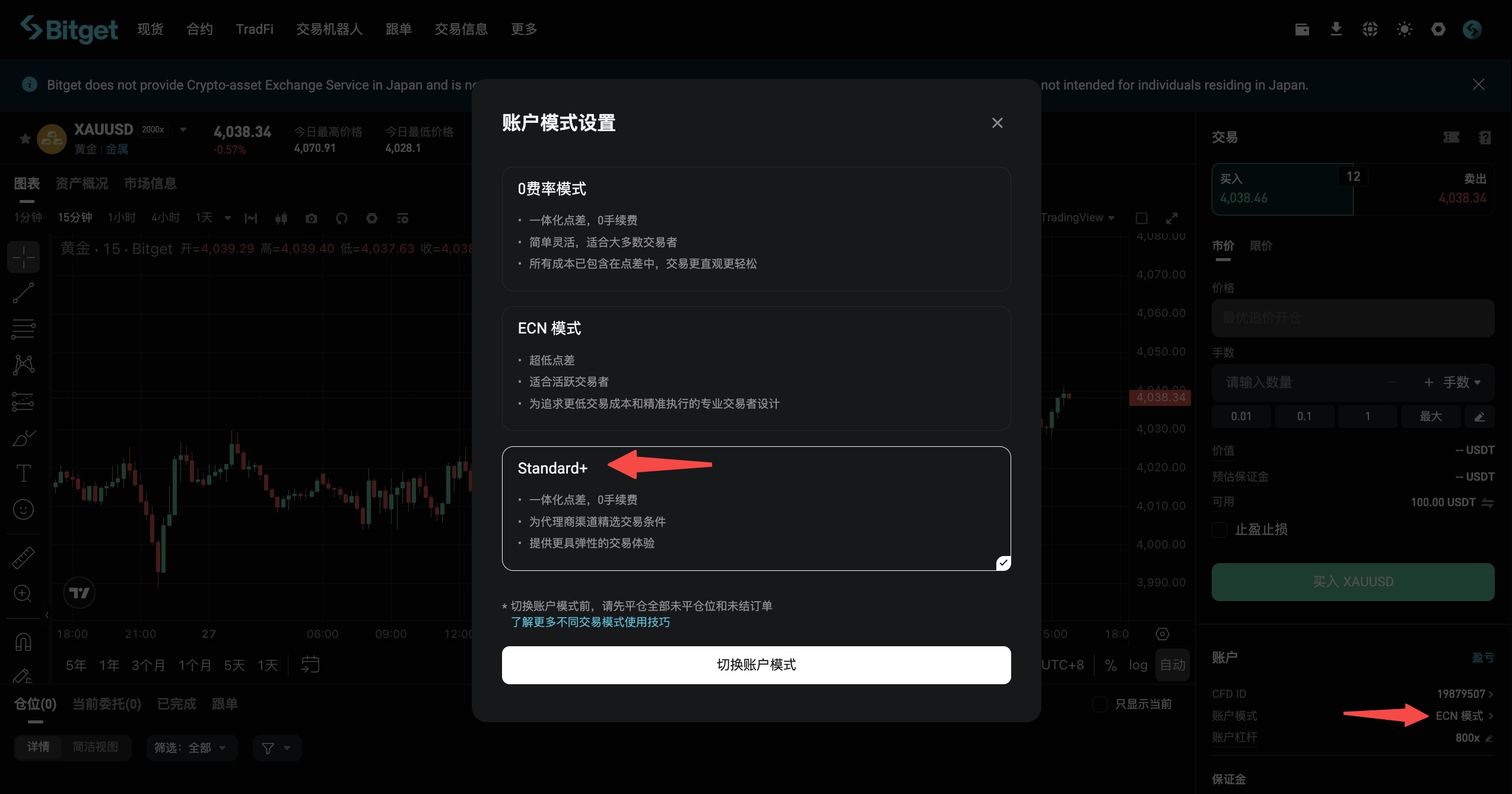
Go to Preferences → Account Mode to open the selection window. Select Standard+ and confirm (same logic as in the app).
Now you understand it, it is time to trade it!
Bitget offers one-stop trading for cryptocurrencies, stocks, and gold.
Trade now!
Share
link_icontwittertelegramredditfacebooklinkend
Content
  •  
  • 1. Overview of the four modes
  •  
  • 2. Which mode is right for each type of user
  •  
  • 3. Affiliate rebates under each mode
  • 4. Users' trading costs
  • 5. How affiliates generate referral links preset to each CFD account mode
  • 6. How to help users switch CFD account modes
How to buy BTCBitget lists BTC – Buy or sell BTC quickly on Bitget!
Trade now
We offer all of your favorite coins!
Buy, hold, and sell popular cryptocurrencies such as BTC, ETH, SOL, DOGE, SHIB, PEPE, the list goes on. Register and trade to receive a 6200 USDT new user gift package!
Trade now
Up to 6200 USDT and LALIGA merch await new users!
Claim