
Backend tutorials

Affiliate Portal upgrade details (November 6, 2026)
Beginner
2026-11-09 | 5m
Bitget offers one-stop trading for cryptocurrencies, stocks, and gold. Trade now!
A welcome pack worth 6200 USDT for new users! Sign up now!
The Affiliate Portal will be upgraded on November 9, 2026, allowing you to view data broken down by asset type: futures data will be split into
crypto futures and stock perps, while spot data will be split into crypto spot and spot stocks. Stock-related data previously spread across multiple pages will now be available in one place in
Profit Center.
No action is required from you.All affiliates will get the upgrade automatically. No application or activation is needed. The upgrade only adds data filter features, and won't affect rebate rates, profit calculations, settlement cycles, or the withdrawal process. The filters you are used to also remain available.
1. What has been improved
This upgrade covers four modules: homepage, Referral Center, Profit Center, and Referral Promotion. You will see an overview in the table below, followed by details on each module.
|
Module
|
Changes you will see
|
|
Homepage
|
You'll be able to expand the statistics cards for a breakdown by product with additional information displayed at the bottom, split trend overview and rankings by asset type, and hover over the referral link card to see rebate rates for each product.
|
|
Referral Center
|
Trend analysis will have a new filter for asset type, and the
First Trade Distribution and
Active Trade Distribution cards will show a breakdown by product. In the app, the
Trading tab under
User Overview will have a product filter.
|
|
Profit Center
|
You'll be able to filter profit data for each transaction type by asset type, and a new
Stock Earnings tab will bring all stock-related rebates together. In the app, rebate metrics will expand to show details.
|
|
Referral Promotion
|
The referral link list will include a product filter, and conversion analysis will break down contributions by product.
|
2. Homepage: More details and more comprehensive insights
Expand statistics cards to view details
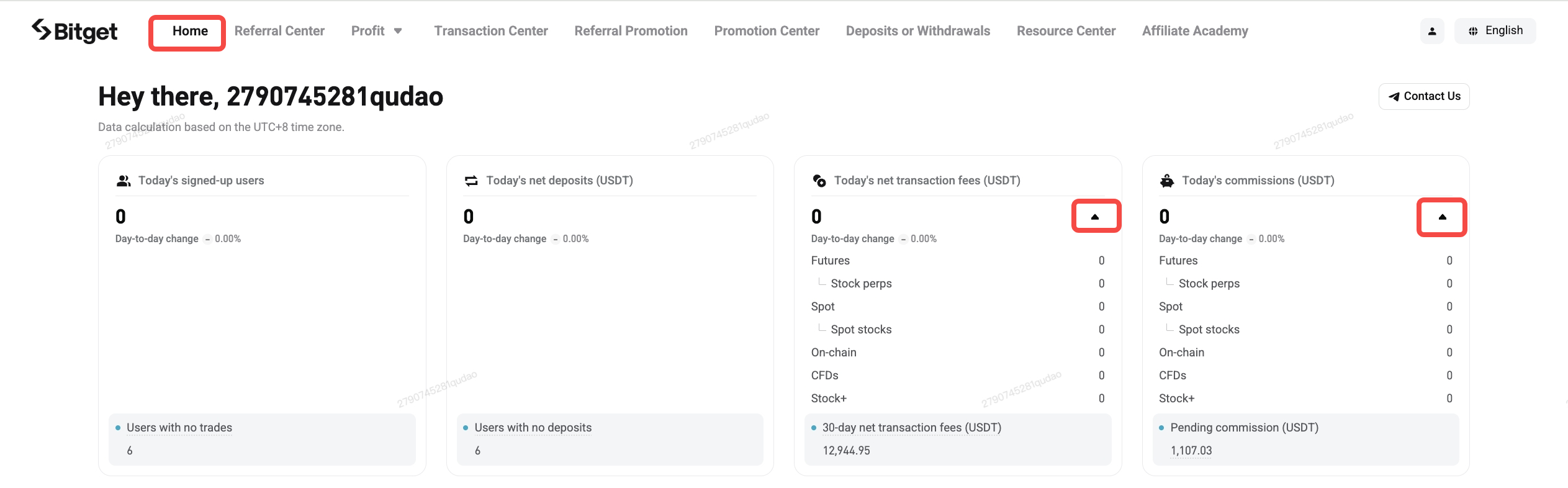
: A triangle icon (▾) has been added to the upper-right corner of each statistics card on the homepage. Select it to view the day's data for each product. Stock perps and spot stock data will appear under their respective product types, giving you a clear view of stock perps and spot trading volumes.
More reference at the bottom of each card
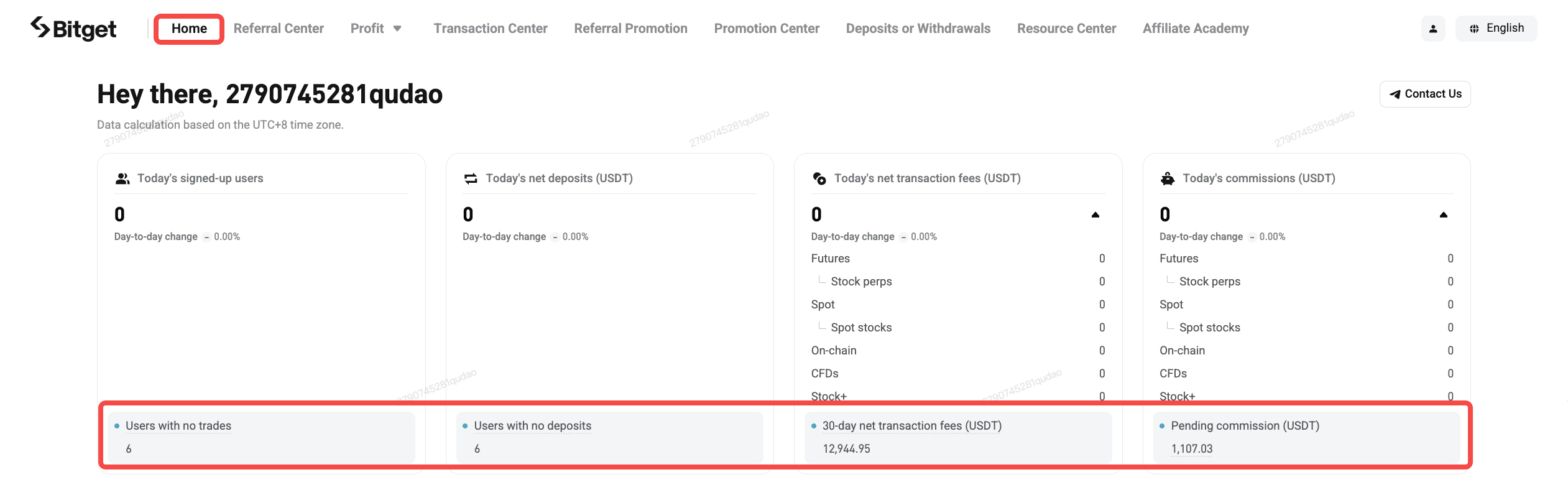
: Additional information has been added to the bottom of each of the four statistics cards, including users with no trades, users with no deposit, 30-day net transaction fees, and pending commission. Select the pending amount to view the estimated arrival date.
Trend
charts
can be broken down by asset type
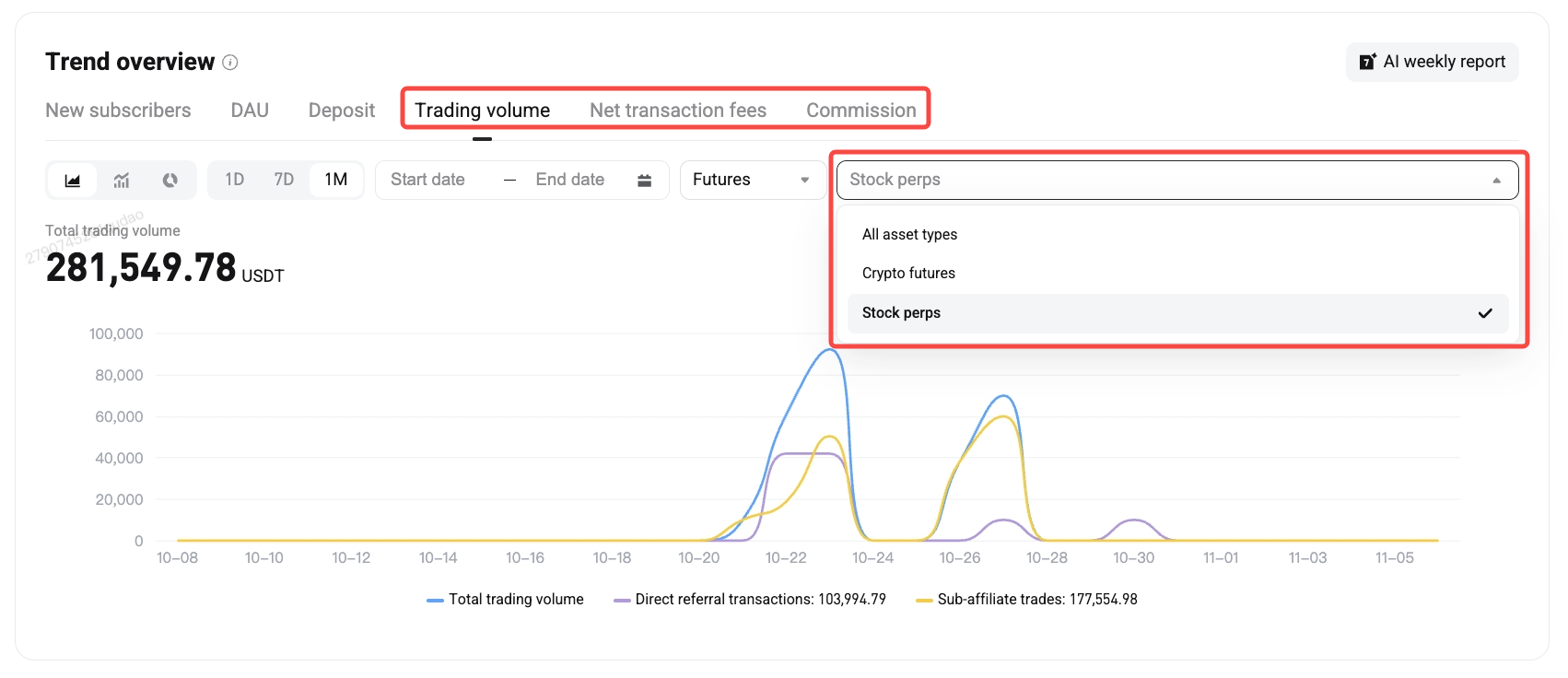
: In
Trend Overview, when viewing trading volume, net transaction fees, or commission, selecting
Futures,
Spot, or
Stock+ will display an
Asset Type dropdown on the right, where you can select a specific one. For example, to view stock perps trading volume, select
Trading Volume → Futures → Stock perps. The chart will then show stock perps trading volume, excluding crypto futures.
Contributions from different asset types on the leaderboard
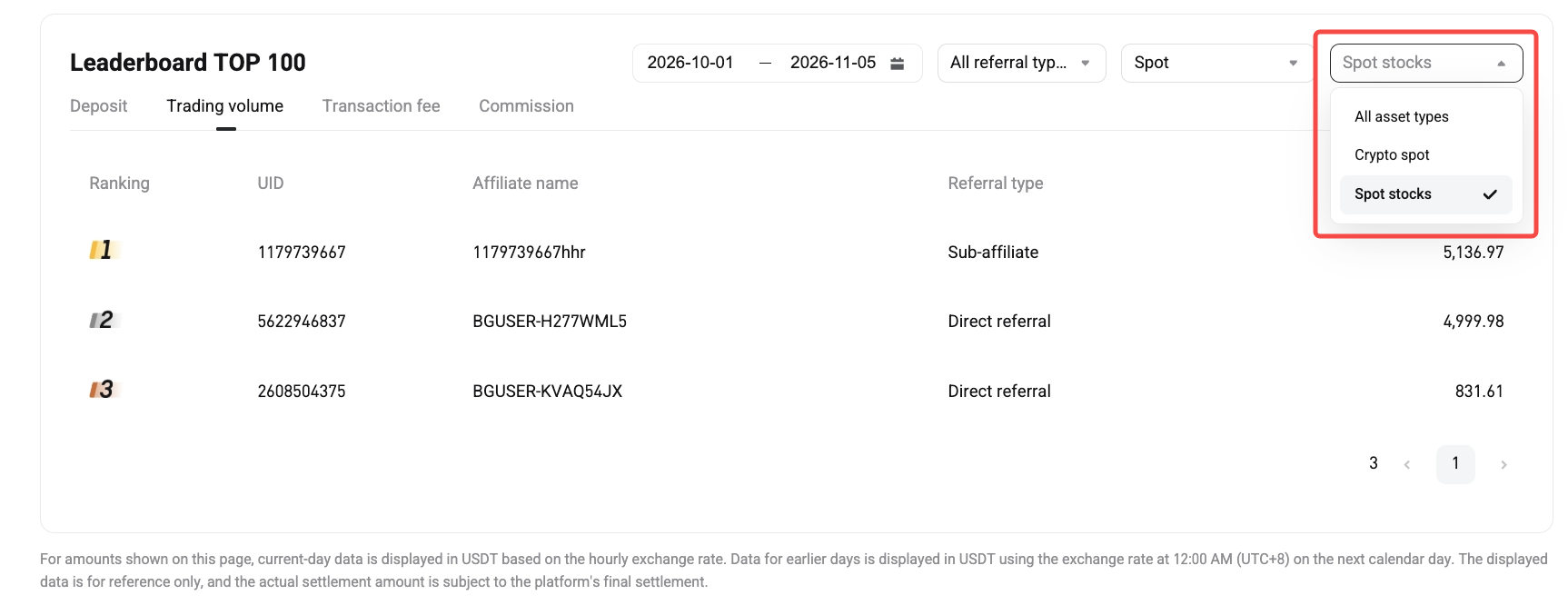
: The leaderboard can now display contributions by asset type, helping you identify which segments and users contribute the most. For example, to see which spot stock traders contributed the most commission, filter by
Spot → Spot Stocks.
All referral link
rebate rates
at a glance
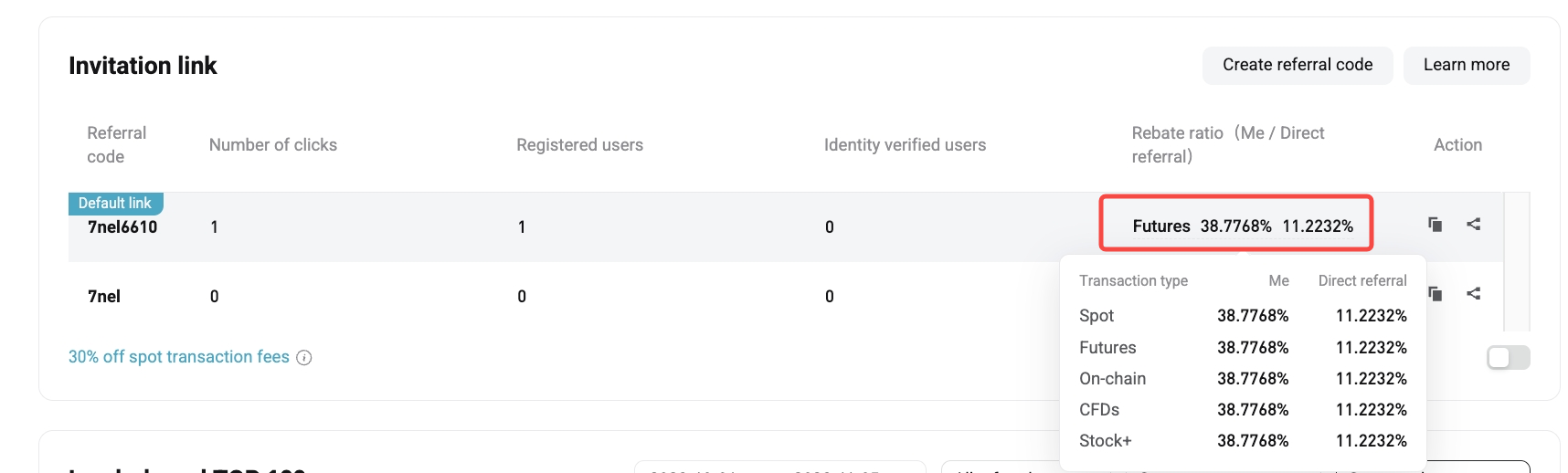
.Hover over the rebate rate on a referral link card to view the rebate rates for all five products, including your own rates and the direct referral rates.
3. Referral Center: Understand user activity across each product
Filter
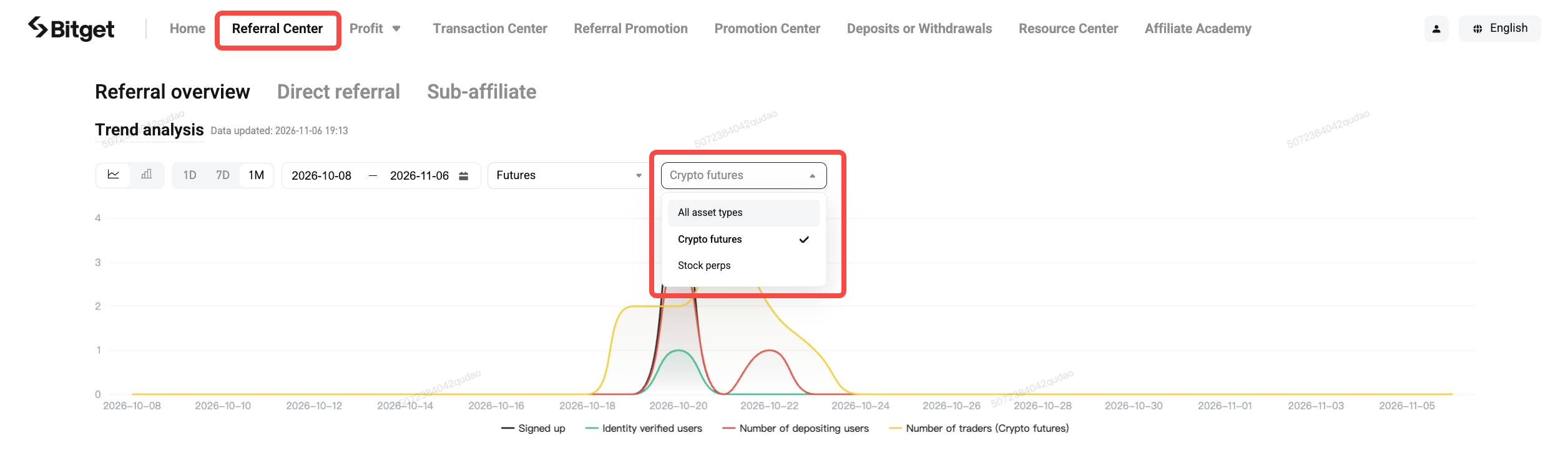
trend analysis by
product
: A new product filter has been added. When you select
Futures, Spot, or
Stock+, an
Asset Type dropdown will appear on the right, where you can select a specific one.
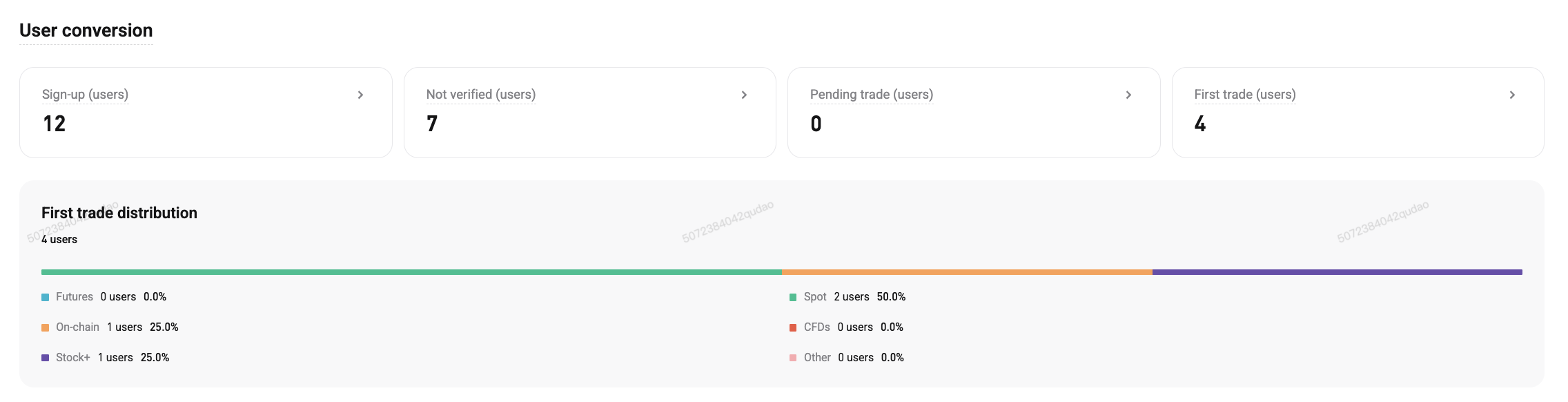
New details on the First Trade Distribution card
: In the
User Conversion section, the
First Trade Distribution card now includes details for five products: Futures, Spot, CFD, Stock+, and Onchain. The number and percentage of users under each product
will help you understand which product new users start trading with.
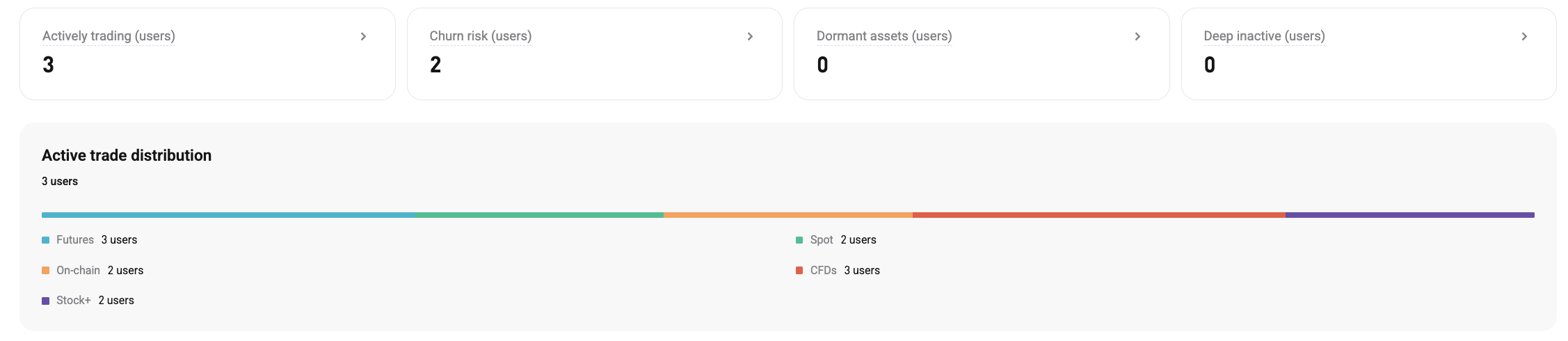
New details on the Active Trade Distribution card
: In the
User Conversion section, the
Active Trade Distribution card now includes details for five products: Futures, Spot, CFD, Stock+, and Onchain. The number of active users under each product
will help you understand the main types of trading activity among all your referrals.
Changes
in the app
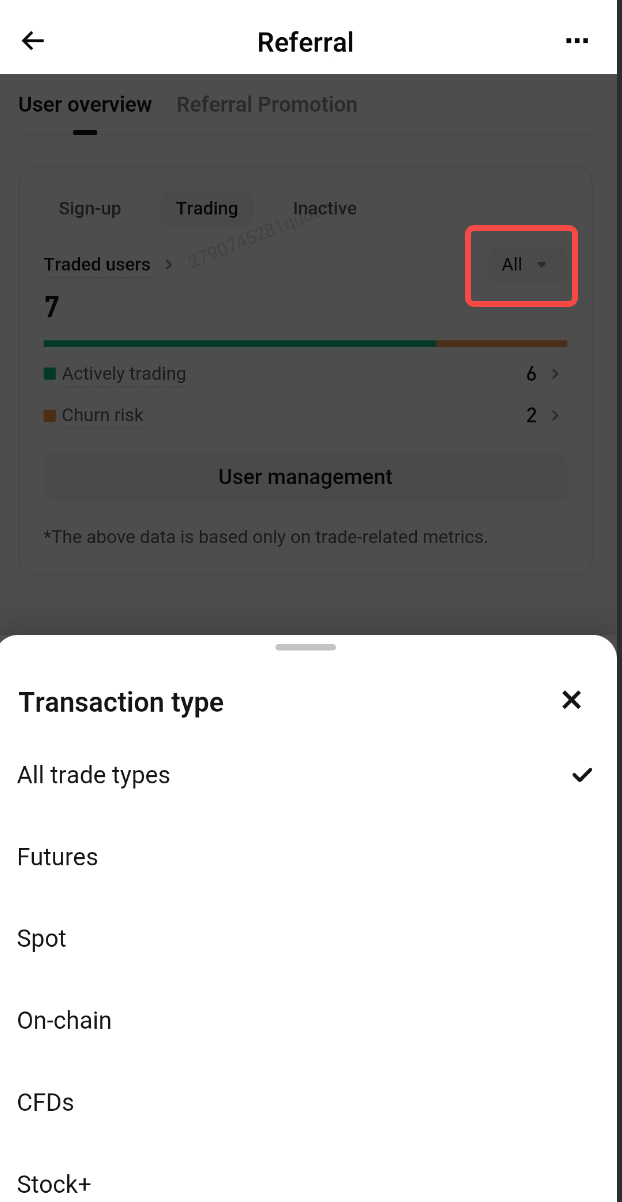
: A product filter has been added to the
Trading card on the
User Overview tab. Select
All to apply a filter.
4. Profit Center: Consolidated stock earnings
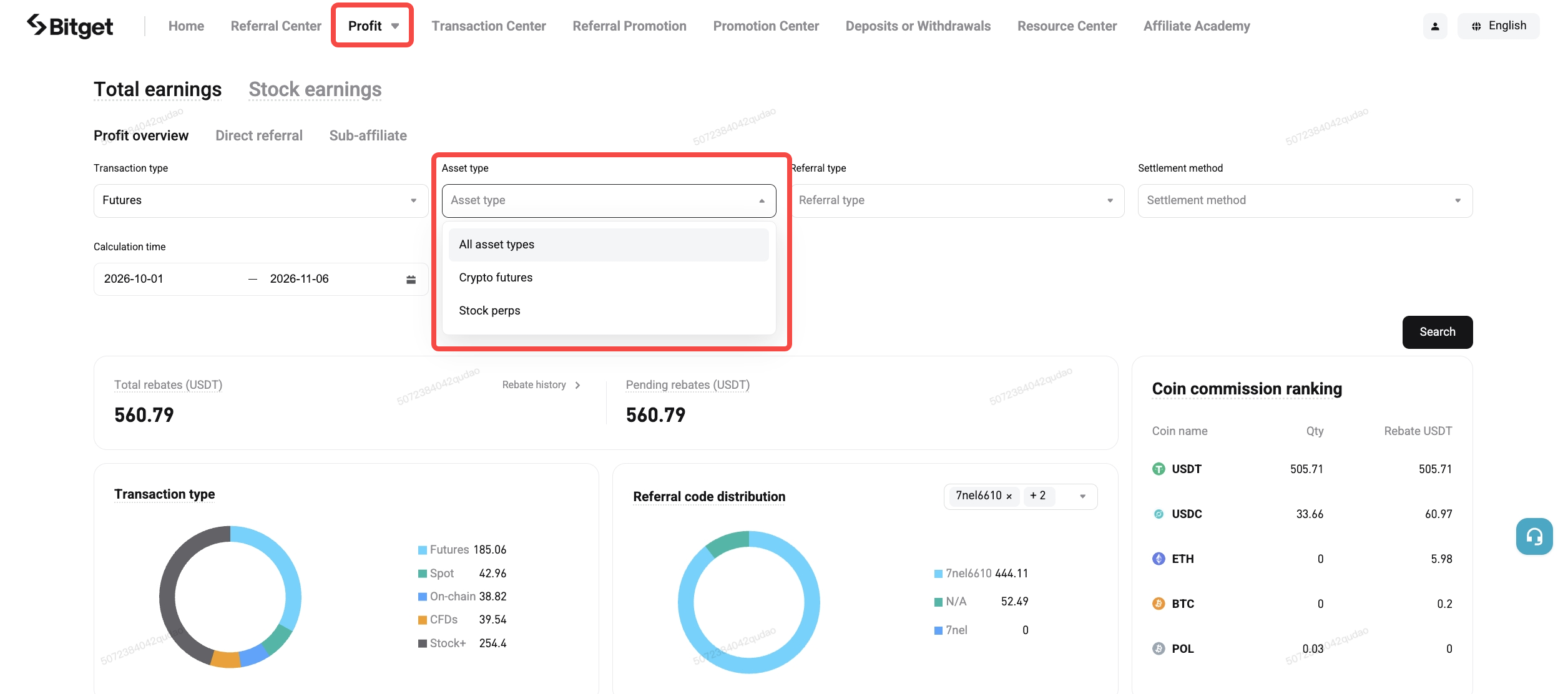
Filter
by
asset type: Asset type options have been added to the transaction type filter in the Profit Center. Once selected, the earnings summary card above and the details table below will update simultaneously, with matching figures in both places.
New Stock
Earnings
tab
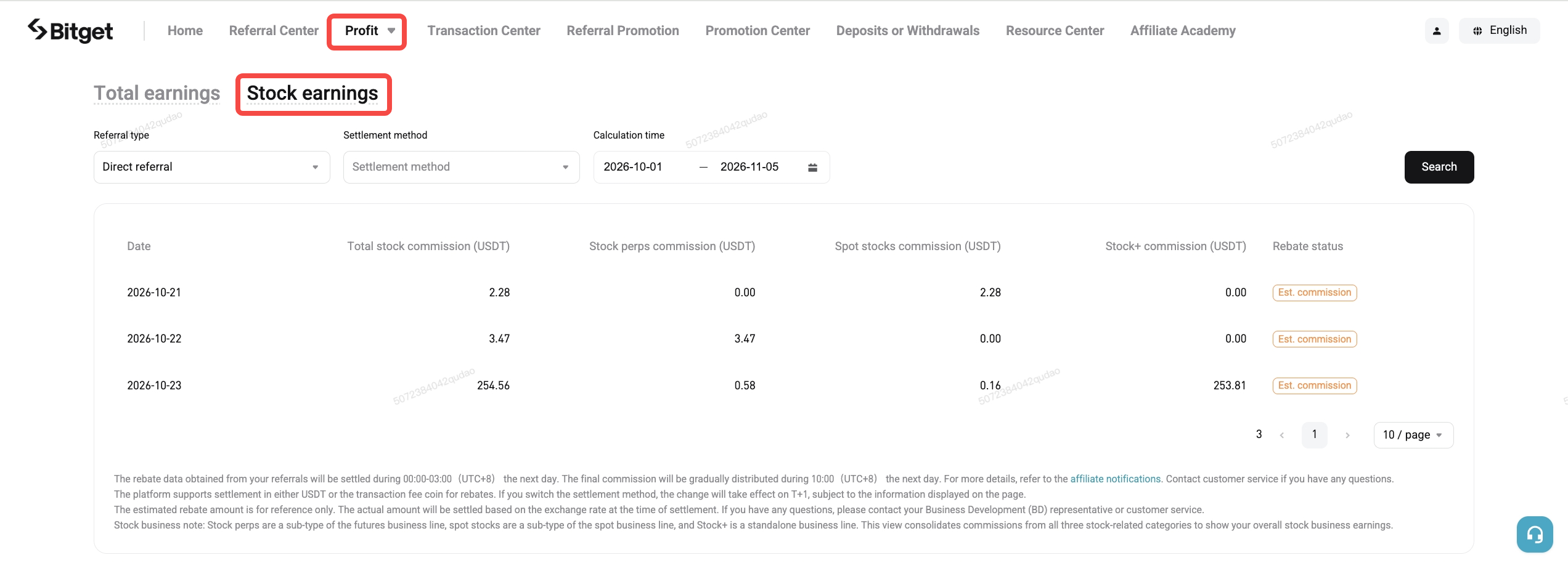
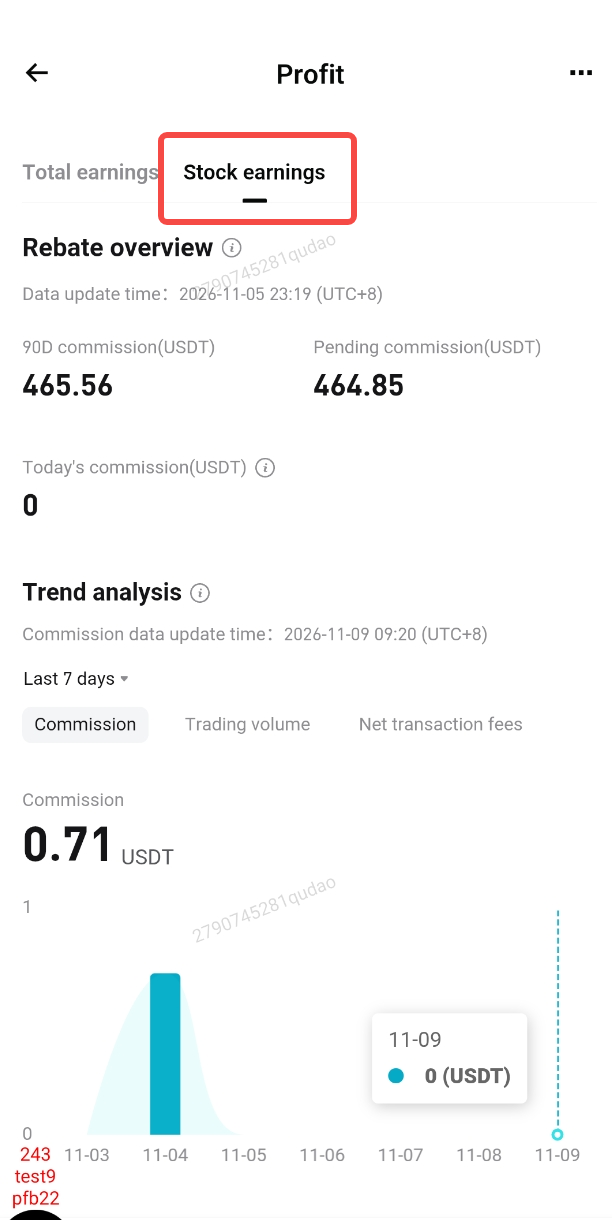
: This is the most useful stock-related improvement in this upgrade. Previously, stock-related commissions were spread across different pages. Now, simply select the
Stock Earnings tab to view commissions from stock perps, spot stocks, and Stock+ together, with the total shown in bold. To see your total earnings from stock-related products, simply open this tab.
Changes
in the app
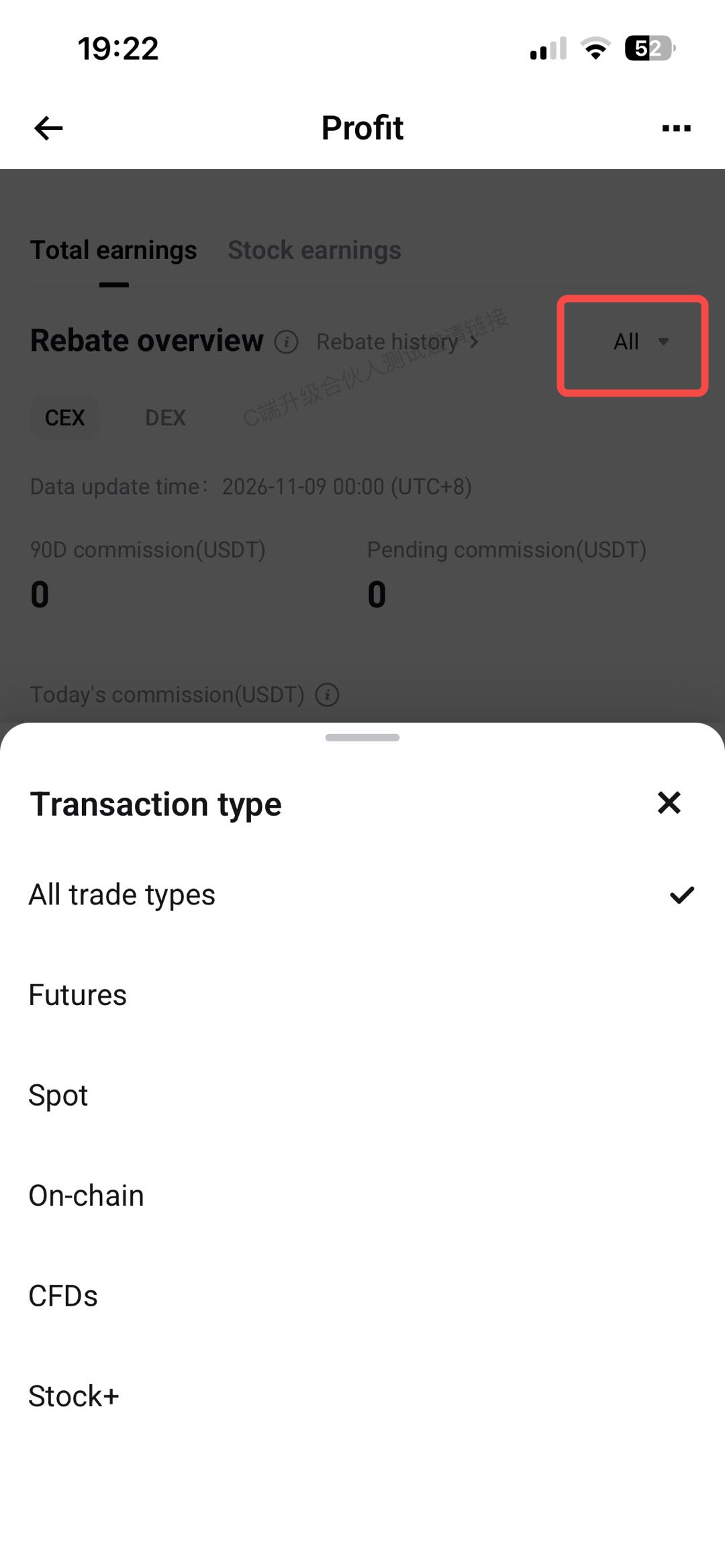
: 1.
Expansion arrows have been added next to the three metrics in Rebate overview:
90D Commission, Pending Commission, and
Today's Commission. Select an arrow to view details for each product. 2. A new
Stock Earnings tab has been added. To see your total earnings from stock-related products (including stock perps, spot stocks, and Stock+), simply open this tab.
 |
 |
5. Referral promotion: Manage referral links by product
Filter
the referral link list
by product
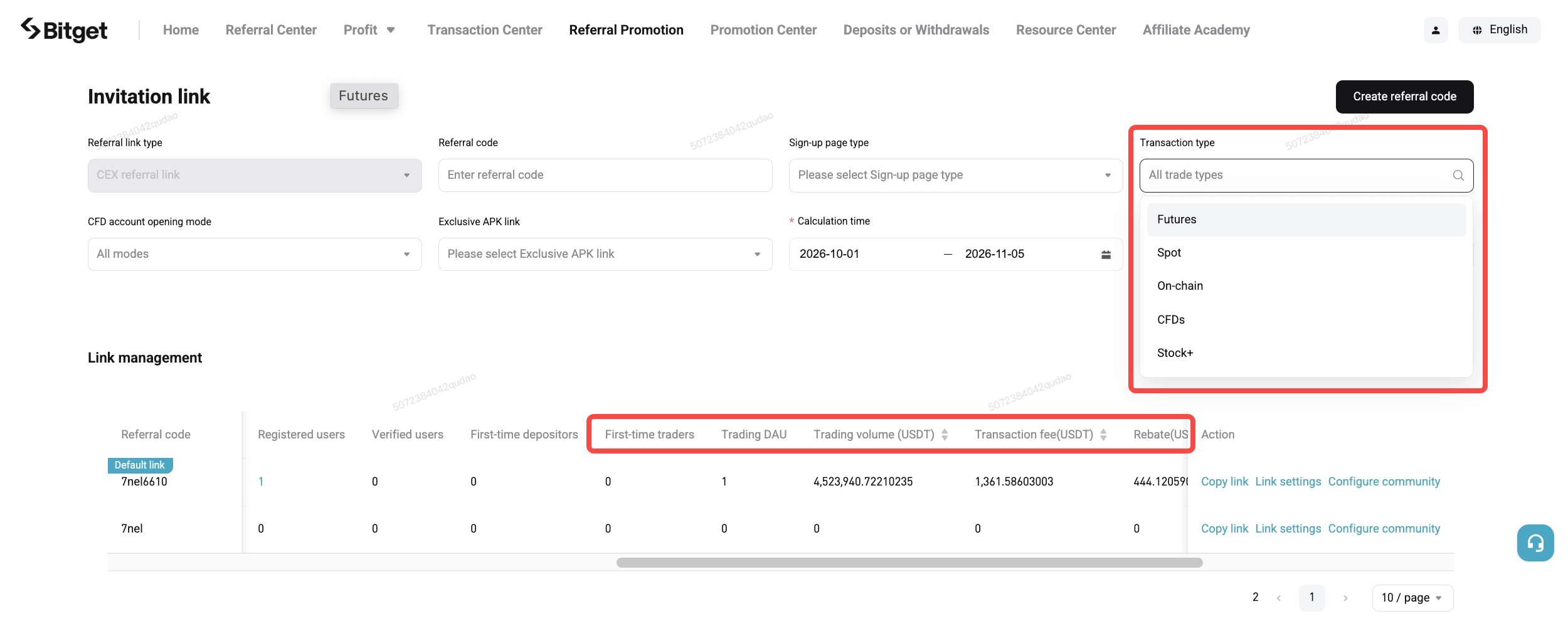
: A new
Transaction type dropdown has been added to the list, allowing you to view referral link data for a specific product. For example, you can review the first-time futures trader conversions for each referral link to identify which link performs best for futures trading conversion.
Product-specific analysis section under conversion analysis
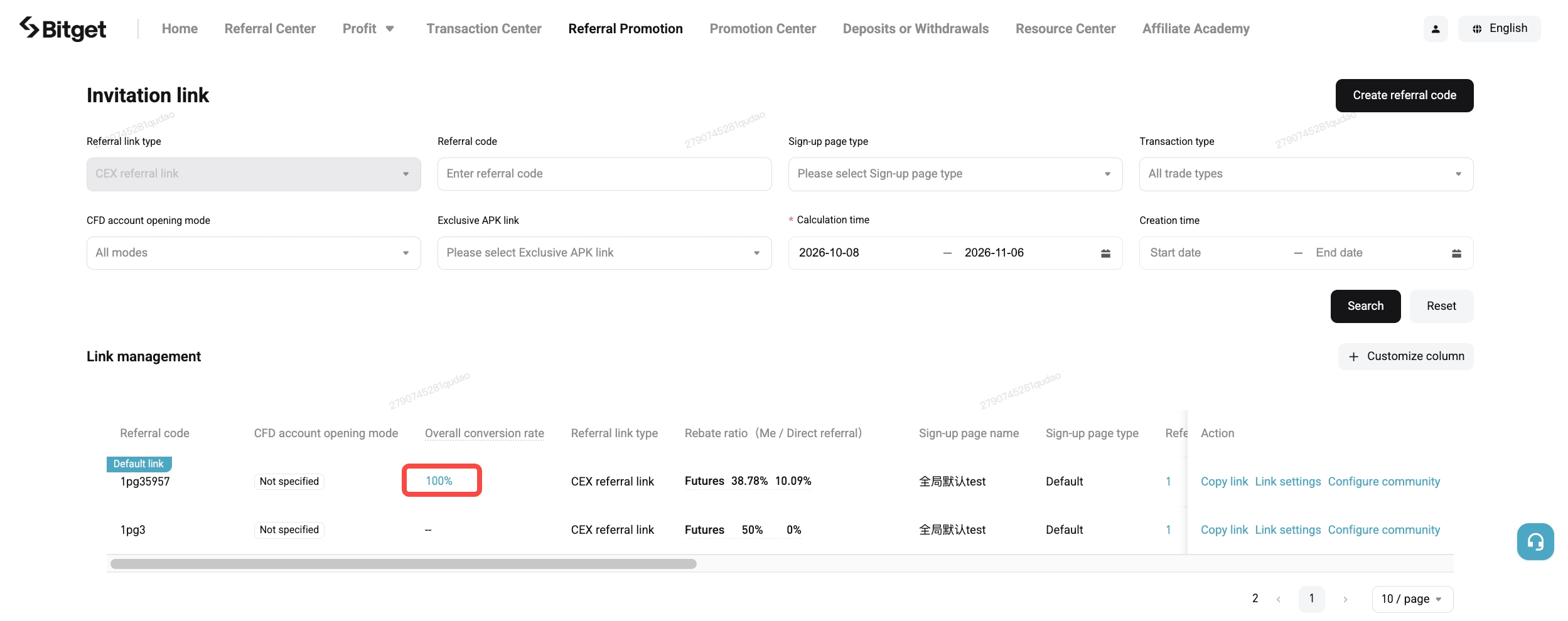
: In the referral link list, select the
Overall Conversion Rate value to open the
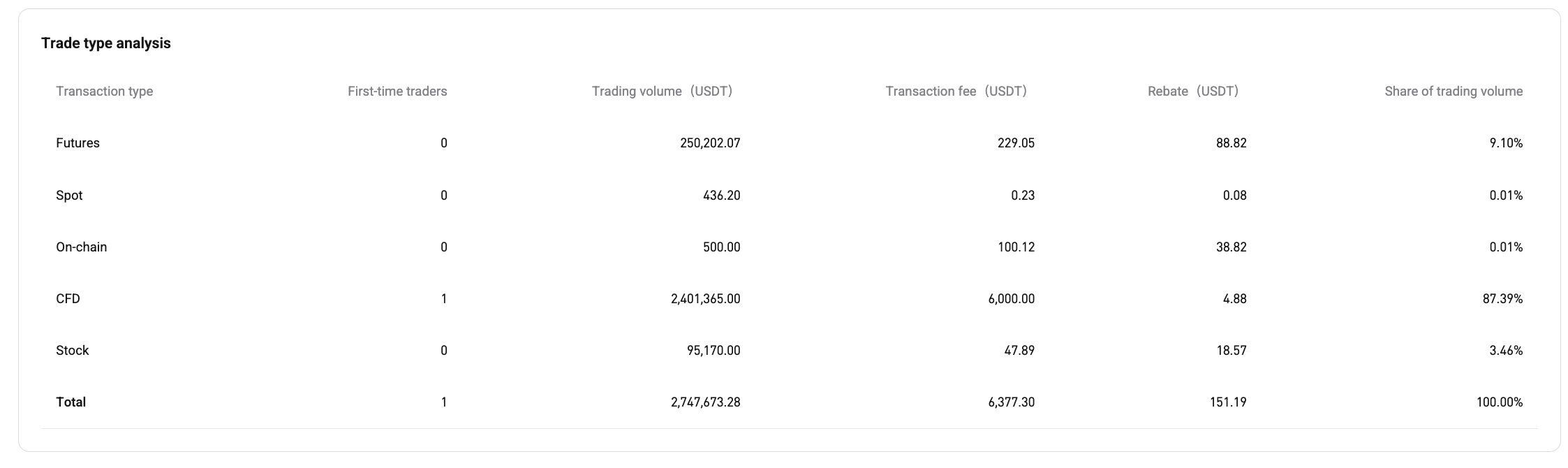
Conversion Analysis page. A
Trade Type Analysis section has been added below the conversion funnel. It shows the number of first-time traders, trading volumes, transaction fees, rebates, and share of trading volume for each product. This helps you determine which product attracts the most active and valuable users through a specific referral code.
6. FAQ
6.1 What has changed in this upgrade?
An
Asset Type filter has been added. Previously, you could only view summaries by product. You can now break down data by asset type: futures can be divided into crypto futures and stock perps, while spot can be divided into crypto spot and spot stocks.
6.2 Where can I find the Asset Type filter?
It is available in
Trend Overview on the homepage,
Trend Analysis in the Referral Center, and the transaction type filter in the Profit Center. When you select
Futures, Spot, or
Stock+, an
Asset Type dropdown will appear on the right. This dropdown will not appear when you select CFD or Onchain because these products do not have further asset-type breakdowns.
6.3 How can I view the overall performance of stock-related products?
Go to the Profit Center page and select the
Stock Earnings tab. Commissions from stock perps, spot stocks, and Stock+ will be displayed together.
6.4 Will the upgrade affect my existing data?
No. It only adds an asset type filter for viewing data. The existing product-based views, data calculation basis, and display formats will remain unchanged.
6.5 Will it affect my rebate rate?
No. The upgrade only adds new ways to view data. The rebate rate configuration rules and calculation logic will remain unchanged.
6.6 Will it affect the settlement cycle and commission distribution?
No. Settlement cycles, payout processes, existing earnings, and pending commissions will not be affected.
Now you understand it, it is time to trade it!
Bitget offers one-stop trading for cryptocurrencies, stocks, and gold.
Trade now!Share


Content
- 1. What has been improved
- 2. Homepage: More details and more comprehensive insights
- 3. Referral Center: Understand user activity across each product
- 4. Profit Center: Consolidated stock earnings
- 5. Referral promotion: Manage referral links by product
- 6. FAQ
How to buy BTCBitget lists BTC – Buy or sell BTC quickly on Bitget!
Trade nowWe offer all of your favorite coins!
Buy, hold, and sell popular cryptocurrencies such as BTC, ETH, SOL, DOGE, SHIB, PEPE, the list goes on. Register and trade to receive a 6200 USDT new user gift package!
Trade nowUp to 6200 USDT and LALIGA merch await new users!
Claim